Skip to content

RBQ SDK — ROS2 Overview ​

The RBQ ROS2 SDK (rbq_sdk/ros2/) provides a ROS 2 Humble interface to the RBQ robot, including robot state publishers, sensor data streams, vision topics, and command subscribers.

What the ROS2 SDK provides ​

  • Robot Control — Gait switching, posture commands, velocity control, auto-docking.
  • Sensor Feedback — IMU, joint states, leg joint status, foot contact, and battery state.
  • Vision Streaming — Front, rear, and body camera topics (RGB, IR, Depth, camera_info).
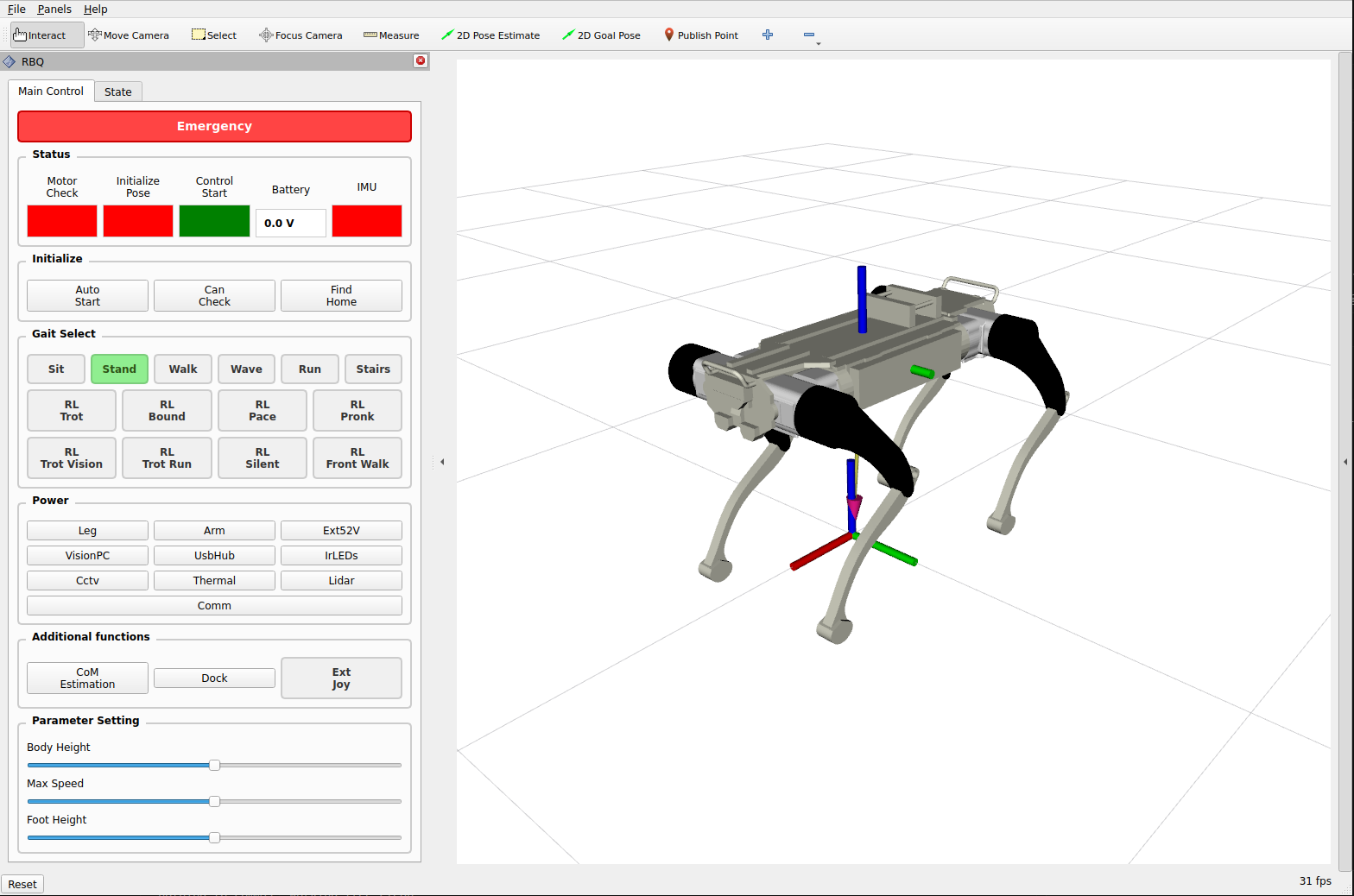
  • RViz2 Visualization — URDF robot model with custom RViz panel for live commands.

System requirements ​

ComponentRequirement
OSUbuntu 22.04
ROS 2Humble
RMWrmw_cyclonedds_cpp
Python3.8 / 3.9 / 3.10

Quick install ​

bash
# Install ROS Humble (first time) — https://docs.ros.org/en/humble/Installation/Ubuntu-Install-Debs.html
sudo apt update && sudo apt install -y ros-humble-desktop \
    python3-colcon-common-extensions python3-rosdep \
    ros-humble-rmw-cyclonedds-cpp ros-humble-cyclonedds
sudo rosdep init && rosdep update
source /opt/ros/humble/setup.bash

# Build the SDK workspace
cd rbq_sdk/ros2
rosdep install --from-paths src -y --ignore-src
colcon build --symlink-install
source install/setup.bash

No driver node ​

There is no separate driver node to run. The robot's onboard core software (Network) speaks ROS 2-compatible DDS directly, so ros2 topic, rviz2, and rqt interoperate with the robot without launching any bridge process. (The legacy rbq_driver node is removed. scripts/start_ros_driver.bash is only a stub left in its place: it prints a deprecation notice every 10 seconds until you stop it.)

Run (simulation) ​

Launch the MuJoCo simulator (which runs the same DDS bridge as the robot), then source the workspace in another terminal to see the topics. The simulator opens DDS on the loopback interface lo only, so point CycloneDDS at lo too — without it ros2 topic list shows none of the robot's topics. lo has no multicast, so CycloneDDS finds peers by participant number, and its default limit (9) runs out next to sim.bash --vision (Failed to find a free participant index) — hence MaxAutoParticipantIndex:

bash
bash scripts/sim.bash

# in another terminal
source rbq_sdk/ros2/install/setup.bash
export RMW_IMPLEMENTATION=rmw_cyclonedds_cpp
export CYCLONEDDS_URI='<CycloneDDS><Domain><General><Interfaces><NetworkInterface name="lo"/></Interfaces></General><Discovery><MaxAutoParticipantIndex>60</MaxAutoParticipantIndex></Discovery></Domain></CycloneDDS>'
ros2 topic list

Run (real robot) ​

Once the robot is powered on and on the same network, source the workspace and use ROS 2 tools directly — there is no driver to launch:

bash
source rbq_sdk/ros2/install/setup.bash
export RMW_IMPLEMENTATION=rmw_cyclonedds_cpp
ros2 topic list

Run the examples ​

The rbq_examples package ships three runnable nodes:

bash
source rbq_sdk/ros2/install/setup.bash
ros2 run rbq_examples rbq_high_level   # high-level velocity / posture commands
ros2 run rbq_examples rbq_target_go    # relative go-to-target navigation
ros2 run rbq_examples depth_to_pcl     # depth image → PointCloud2

Walkthroughs: High-Level Control · Target-Go · Depth → PointCloud.

rbq_status_example is compiled but not installed, so ros2 run cannot find it — read it from rbq_sdk/ros2/src/rbq_examples/src/ as a reference.

RViz2 Visualization ​

Visualize robot state, URDF model, and sensor data in real time — and send commands — via the RViz2 GUI panel.

bash
bash scripts/start_rviz.bash
RViz2 visualization

This user manual is intended for RBQ users.