Skip to content

Isaac Sim ​

Introduction ​

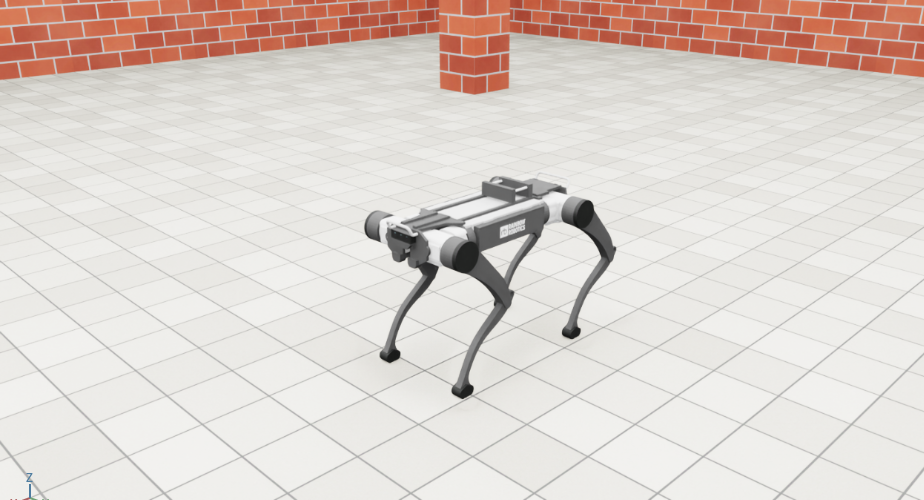
Isaac Sim simulator for the RBQ quadruped robot.

Isaac Sim runs the full RBQ software stack (Motion / Vision / GUI), so SLAM research, autonomous navigation tests and every test you would run on the real robot can be done in simulation. It joins the running RBQ stack as a DDS peer on the same topics, so the robot software runs unchanged. It uses the same robot model as the Isaac Lab training environment, and adds USD worlds with stairs, ramps and rough terrain.

Isaac Sim
Isaac Sim

Requirements ​

  • Ubuntu 22.04 and an NVIDIA RTX GPU. NVIDIA's own list is Isaac Sim 5.1 requirements.
  • Isaac Sim 5.1.0 and Isaac Lab, installed by the script below into the same conda environment (rbq-lab) as Isaac Lab. The environment takes about 22 GB of disk.
Tested PCRecommended
CPUIntel Core Ultra 7 265KF (20 cores)Recent 8-core or more. Physics runs on one CPU core, so single-core speed sets the real-time factor
GPUGeForce RTX 5080, 16 GBGeForce RTX 5080 or higher, 16 GB
RAM64 GB32 GB or more
DiskNVMe SSD50 GB free on an SSD
DriverNVIDIA 580.159NVIDIA 580 branch

On the tested PC, with the RBQ stack running, the simulator ran at about 0.85x real time headless and about 0.6x with the window open, using about 6 GB of RAM and 1.5 GB of GPU memory.

Layout ​

PathDescription
rbq_simulator/rbq_sim/rbq_sim/Simulator sources (Python)
rbq_simulator/rbq_sim/worlds/USD worlds that ship with the package
rbq_simulator/rbq_sim/scripts/Run / environment scripts
scripts/issac_sim.bashStarts Motion, Isaac Sim and the web UI together
scripts/install/isaacsim.bashInstalls Isaac Sim

Options ​

OptionMeaning
--world <name>World to load. Default rbq_test. See Worlds
--headlessRun without the Isaac Sim window
-i, --interface <name>DDS network interface. Default lo
--visionSimulate the robot's cameras. See Cameras
--livox / --ousterSimulate a LiDAR — one of the two. See LiDAR
--rvizAlso open RViz with the bundled sensor view (robot model, TF, cameras, LiDAR). The joint states and the robot pose come from the RBQ core SW, so use it with --core or a running core SW
--corerun.bash only: also start the RBQ core SW and open the web UI. With --vision it starts the Vision stack too; --no-gui skips the browser

scripts/issac_sim.bash takes the same --world, --headless, --vision, --rviz and -i; its --vision starts the Vision stack as well as the cameras. The RBQ core SW already publishes its ROS 2 topics, so no separate driver is needed.

Worlds ​

Kind--worldNotes
RBQ test fieldrbq_test (default)The MuJoCo / Gazebo test field. Works offline
Flat groundemptyNo download
Isaac Sim samplesgrid, office, hospital, simple_room, warehouse, depot, warehouse_shelves, warehouse_forkliftsDownloaded from NVIDIA on first use
Bundledstairs_course, two_floor_office, terrain_parkWork offline
Bundled worldContents
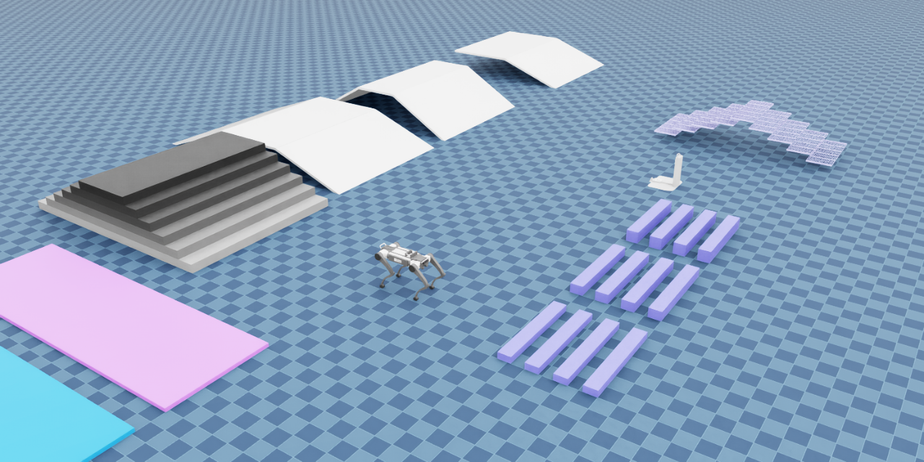
rbq_testThe same layout as MuJoCo: pyramid stairs (0.15 m x 6), 20° / 30° slopes, obstacle bars (0.10 / 0.15 / 0.20 m), slippery strips, the docking station with its ArUco markers, grating stairs, a ball and bricks
stairs_course32 x 16 m hall with stairs (0.10 m and 0.15 m rise), 10° / 15° / 20° ramps, rough blocks, stepping stones and curbs
two_floor_officeTwo floors joined by a switchback staircase (0.15 m x 20 steps), with room loops on both floors
terrain_park40 x 40 m outdoor park with pyramid stairs, rough terrain, a 15° hill and a raised plaza with stairs and a ramp
rbq_test (default world)
rbq_test

Using your own USD ​

Add an entry to WORLDS in rbq_simulator/rbq_sim/rbq_sim/worlds.py, then run it by name:

python
"my_site": {"spawn": (0.0, 0.0, 0.30, 0.0),   # x, y, z [m], yaw [rad]
            "usd": "/path/to/my_site.usd"},    # absolute path, or a file:// / omniverse:// URL
bash
bash scripts/issac_sim.bash --world my_site

The USD replaces the flat ground, so it must contain a floor with collision. The robot starts sitting at the spawn pose. If the floor is not at height 0, raise z by the floor height.

Run with the full RBQ stack (Local) ​

bash
# Clone
git clone https://github.com/RainbowRobotics/RBQ.git
cd RBQ

# Install Isaac Sim (first time only, as a normal user; only the apt step asks for sudo)
bash scripts/install/isaacsim.bash

All at once — Motion, Isaac Sim and the web UI in separate terminal tabs:

bash
bash scripts/issac_sim.bash
bash scripts/issac_sim.bash --world stairs_course
bash scripts/issac_sim.bash --headless

With --core — the simulator also starts the RBQ core SW. The core SW runs in its own terminal tabs and keeps running after the simulator exits; close those tabs to stop it:

bash
bash rbq_simulator/rbq_sim/scripts/run.bash --core --world stairs_course
bash rbq_simulator/rbq_sim/scripts/run.bash --core --vision --headless
bash rbq_simulator/rbq_sim/scripts/run.bash --core --rviz --world stairs_course

One by one — the RBQ stack and the simulator in two terminals:

bash
bash scripts/start_motion.bash --sim                                   # terminal 1, asks for sudo
bash rbq_simulator/rbq_sim/scripts/run.bash --world stairs_course      # terminal 2

Open http://127.0.0.1:8080 in a browser to drive the robot (sign in with rb / rainbow2026). The first start takes a few minutes while Isaac Sim builds its shader cache.

Cameras ​

--vision adds the robot's six cameras at the same poses as in MuJoCo and publishes them on the same topics, so the Vision stack (HAL) reads them as it does from MuJoCo:

SensorCameraStreams
sensor_0–sensor_3Bottom (front, mid-front, mid-rear, rear)depth, IR
sensor_4Frontdepth, RGB
sensor_5Reardepth, RGB

Each camera is 640 x 360 at 15 fps of simulation time. Topics are rt/rbq/vision/sensor_N/<stream>/compressed (RGB and IR as JPEG, depth as 16-bit PNG in mm), with camera_info and tf beside them. Rendering six cameras is heavy: on the tested PC the headless simulator dropped from about 0.85x to about 0.36x real time, so the cameras deliver about 5 frames per wall-clock second.

LiDAR ​

--livox and --ouster put the same LiDARs on the same topics as MuJoCo and Gazebo, so the Vision stack (HAL) and SLAM read them unchanged. Add the same flag to the RBQ core SW (--core passes it on as -p livox / -p ouster).

FlagLiDARScan
--livoxLivox Mid-360 pair, lidar_front / lidar_rearMuJoCo's non-repetitive Mid-360 pattern, 24000 points per frame, 50 m
--ousterOuster OS1 on the rear deck, lidar_ouster1024 x 32 over ±22.5°, 0.1–100 m

Each LiDAR scans at 10 Hz of simulation time and publishes rt/rbq/lidar/<name> (PointCloud2 in the sensor frame), <name>/imu (200 Hz) and <name>/tf. Rays are cast against the world as it is at start; the robot itself and objects that move later are not seen.

Control period ​

Isaac Sim runs slower than real time: about 0.85x headless and about 0.6x with the window open. The simulator keeps Motion in step with simulation time, so the robot software still sees a 2 ms control period:

  • Physics runs at 1 kHz. Every 2 ms of simulation time the simulator sends its state and waits for Motion's reply before it moves on.
  • Motion therefore runs exactly one control cycle per 2 ms of simulation time, however slow the rendering is. The robot moves slower on screen, not differently.
  • Every 5 seconds the console prints a line such as lockstep ON acked 1472/1472 timeouts 0. timeouts 0 means no control cycle was skipped.
  • Without Motion the simulator holds the sitting pose and runs at real-time pace.

NOTE — DDS networking

The simulator shares DDS domain 0 on the loopback interface (lo) with the RBQ stack. Most hosts have no multicast on lo, so run.bash loads rbq_simulator/rbq_sim/cyclonedds_sim.xml. Run only one simulator at a time: Isaac Sim, MuJoCo and Gazebo use the same topics.

See also ​

This user manual is intended for RBQ users.