Skip to content

ROS 2 Topic Reference

Complete reference of the ROS 2 topics exposed by the robot's onboard software over CycloneDDS.

There is no separate driver node to run. The core software (Network) speaks ROS 2-compatible DDS directly, so ros2 topic, rviz2, and rqt interoperate with the robot without launching any bridge process. (The legacy rbq_driver node and start_ros_driver.bash are removed — the script is now a deprecated no-op.)

  • Pub — robot publishes, your node subscribes
  • Sub — your node publishes, robot subscribes

Custom message types (rbq_msgs/*, api/*) require sourcing the built workspace:

bash
source rbq_sdk/ros2/install/setup.bash

Topics whose name contains a token starting with _ (e.g. /rbq/_sim, /rbq/_user_command, /rbq/ref/motion/_0) are hiddenros2 topic list shows them only with --include-hidden-topics.

Publish rateNetwork republishes every Pub state topic at ~500 Hz, so the Hz below is that publish rate (measured with ros2 topic hz), not the underlying sensor/value update rate.


Motion Commands

/rbq/cmd/auto_start

FieldValue
Typestd_msgs/Bool
DirectionSub
DescriptionFull initialization sequence: CAN check → Find Home → Control Start. Robot must be in the correct initial pose. Monitor progress via /rbq/robot_status (can_check, find_home, con_start flags).

/rbq/cmd/switch_gait

FieldValue
Typestd_msgs/Int8
DirectionSub
DescriptionSwitch to the target gait by gait_id. See Gait State Reference below.

/rbq/cmd/switch_control_mode

FieldValue
Typestd_msgs/Bool
DirectionSub
Descriptiontrue → HighLevel Command mode (accepts /rbq/cmd/high_level). false → Joystick mode (default).

/rbq/cmd/emergency

FieldValue
Typestd_msgs/Bool
DirectionSub
DescriptionImmediately set all joints to high-damping mode. Robot collapses instantly. Sit the robot down first if testing.

/rbq/cmd/dock

FieldValue
Typestd_msgs/Int8MultiArray
DirectionSub
DescriptionStart the auto-docking sequence. data[0]: walk mode — 0 = wave (default), 1 = trot. data[1]: vision mode — 0 = blind (default), 1 = vision height feedback (trot only). Robot must be in Standing mode and the rear camera must see the ArUco marker (≤ 5 m). Monitor via robot_status.docking_state.

/rbq/ref/payload_params

FieldValue
Typestd_msgs/Float64MultiArray
DirectionSub
DescriptionSet external payload parameters for CoM compensation. data: [mass_kg, com_x, com_y, com_z] (meters). Used when carrying additional loads.

Gait State Reference

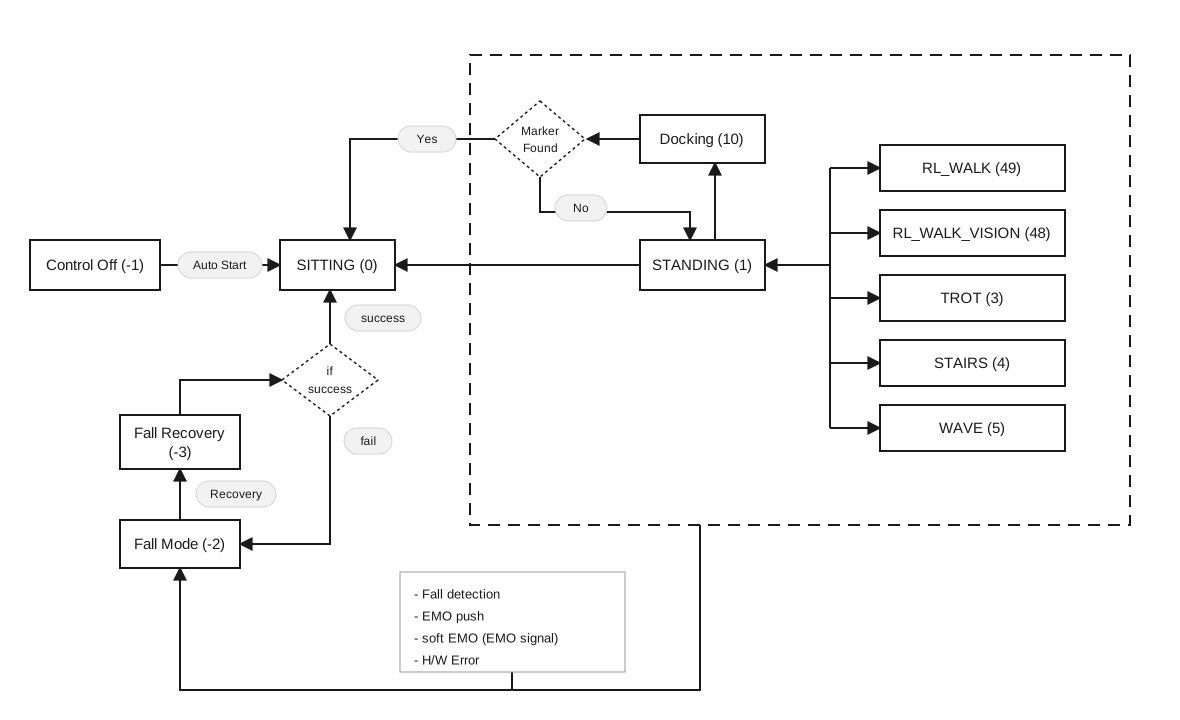
One gait enum is used in both directions: send it on HighLevelCommand.gait_state (also used by switch_gait), and read the same value back on robot_status.gait_id.

gait_idNameDescription
-3Fall RecoveryAutomatic recovery attempt after a fall
-2Fall ModeTriggered by unexpected loss of balance
-1Control OffAll actuators disabled
0SittingLow posture, resting on ground
1StandingNeutral posture, ready to walk
3Walk (Trot)Walking trot gait
4StairsStair-adaptive gait (uses camera)
5WaveWalking wave gait
10DockingAuto-docking sequence
48RL Walk (Vision)Learned walking gait with vision-based terrain adaptation
49RL WalkLearned walking gait

Setting an RL gait

HighLevelCommand.msg does not yet define name constants for 48 / 49 — assign the number directly to gait_state.

Gait state transition diagram

High-Level Control

/rbq/cmd/high_level

FieldValue
Typerbq_msgs/HighLevelCommand
DirectionSub
DescriptionVelocity and posture command. Behavior and valid ranges depend on the current gait. Requires HighLevel mode (switch_control_mode: true).

Fields:

FieldTypeUnitDescription
headerstd_msgs/HeaderROS header with timestamp
identifierstringOptional label for logging/tracking
rollfloat32degBody roll. Standing [-25, +25]
pitchfloat32degBody pitch. Standing [-20, +20], Walk (body tilt angle), RL Walk [-25, +25]
yawfloat32degBody yaw twist. Standing [-25, +25]
vel_xfloat32m/sForward speed. Walk [-1.0, +1.2] / RL Walk [-1.5, +2.5] / Stairs [-1.0, +1.0]
vel_yfloat32m/sLateral speed. Walk [-0.4, +0.4] / RL Walk [-1.0, +1.0] / Stairs [-0.4, +0.4]
omega_zfloat32deg/sYaw rate. Walk [-75, +75] / Stairs [-17, +17] / Wave [-20, +20] / RL Walk [-86, +86]
delta_body_hfloat32mBody height offset from default. Standing/Walk [-0.15, +0.05] / RL Walk [-0.25, +0.10]
delta_foot_hfloat32mSwing foot lift offset. [-0.06, +0.04]
gait_stateint8Target gait ID (see Gait State Reference)
gait_transitionbooltrue = transition to gait_state first, then apply command

Example commands:

bash
# Walk forward at 0.5 m/s (gait_state: 3 = Walk/Trot)
ros2 topic pub --once /rbq/cmd/high_level rbq_msgs/msg/HighLevelCommand \
'{header: {stamp: {sec: 0, nanosec: 0}, frame_id: "base"},
  identifier: "walk_fwd", roll: 0.0, pitch: 0.0, yaw: 0.0,
  vel_x: 0.5, vel_y: 0.0, omega_z: 0.0,
  delta_body_h: 0.0, delta_foot_h: 0.0,
  gait_state: 3, gait_transition: false}'

# Rotate in place at 30°/s
ros2 topic pub --once /rbq/cmd/high_level rbq_msgs/msg/HighLevelCommand \
'{header: {stamp: {sec: 0, nanosec: 0}, frame_id: "base"},
  identifier: "turn", roll: 0.0, pitch: 0.0, yaw: 0.0,
  vel_x: 0.0, vel_y: 0.0, omega_z: 30.0,
  delta_body_h: 0.0, delta_foot_h: 0.0,
  gait_state: 3, gait_transition: false}'

# Stop (zero velocity)
ros2 topic pub --once /rbq/cmd/high_level rbq_msgs/msg/HighLevelCommand \
'{header: {stamp: {sec: 0, nanosec: 0}, frame_id: "base"},
  identifier: "stop", roll: 0.0, pitch: 0.0, yaw: 0.0,
  vel_x: 0.0, vel_y: 0.0, omega_z: 0.0,
  delta_body_h: 0.0, delta_foot_h: 0.0,
  gait_state: 3, gait_transition: false}'

# Custom standing posture (roll: 15°, pitch: 30°, yaw: 20°)
ros2 topic pub --once /rbq/cmd/high_level rbq_msgs/msg/HighLevelCommand \
'{header: {stamp: {sec: 0, nanosec: 0}, frame_id: "base"},
  identifier: "standing_pose", roll: 15.0, pitch: 30.0, yaw: 20.0,
  vel_x: 0.0, vel_y: 0.0, omega_z: 0.0,
  delta_body_h: 0.0, delta_foot_h: 0.0,
  gait_state: 1, gait_transition: true}'

/rbq/cmd/navigate_to

FieldValue
Typegeometry_msgs/Pose2D
DirectionSub
DescriptionMove to an absolute world-frame pose. x, y set the target position in meters; theta sets the target yaw in radians. Available in Standing and Wave modes.

/rbq/cmd/target_go

FieldValue
Typerbq_msgs/TargetGo
DirectionSub
DescriptionRelative "go to target" navigation command (gait, mode, x/y/theta, offsets, and slow/wide/vision flags). See the Target-Go example.

Robot Status

/rbq/robot_status

FieldValue
Typerbq_msgs/RobotStatus
DirectionPub
Hz500
DescriptionOverall robot status flags, gait state, and docking progress.

Fields:

FieldTypeDescription
headerstd_msgs/HeaderROS header
con_startboolMotor control enabled
ready_posboolRobot is in ready position
ground_posboolRobot is in ground/sitting position
force_conboolForce control mode active
ext_joyboolExternal joystick connected
is_standingboolRobot is physically standing
can_checkboolCAN communication verified
find_homeboolEncoder homing complete
gait_idint8Current gait. See Gait State Reference.
is_fallboolFall detected
docking_stateint8Docking progress (see table below)
imu_successboolIMU connected and operational

Docking State Values:

ValueConstantDescription
-6DOCKING_MAX_FAIL_CNT_REACHEDMax retry count (10×) reached — aborted
-5DOCKING_MARKER_POS_INVALID_ROTATIONMarker rotation > ±40° — aborted
-4DOCKING_MARKER_POS_INVALID_TOO_FARMarker > 5 m — aborted
-3DOCKING_MARKER_POS_INVALID_WRONG_DIRMarker detected on front side — aborted
-2DOCKING_MARKER_NOT_FOUNDMarker not found — aborted
-1DOCKING_FAILEDDocking failed — auto retry
0DOCKING_OPERATION_MODENormal operation (not docking)
1DOCKING_APPROACH_OFFSETStage 1: offset approach
2DOCKING_APPROACHStage 2: direct approach
3DOCKING_APPROACH_WIDEStage 3: wide-stance approach
4DOCKING_SIT_DOWNSitting down to connect
5DOCKING_SUCCESSDocked — charger physically connected
6DOCKING_SUCCESS_CHARGINGDocked and charging
7DOCKING_SUCCESS_NO_CHARGINGDocked but not charging

/rbq/system_log

FieldValue
Typerbq_msgs/SystemLog
DirectionPub
DescriptionRobot-side log stream. Fields: header, string log_level, string log_msg.

State Estimation

/rbq/odometry

FieldValue
Typenav_msgs/Odometry
DirectionPub
Hz500
DescriptionBody pose and velocity in the world frame. Origin resets at startup. Fused from IMU and leg odometry.

/rbq/foot_states

FieldValue
Typerbq_msgs/FootStates
DirectionPub
Hz500
DescriptionFoot positions, velocities, and contact states for all 4 legs relative to the body center frame.

Fields:

FieldTypeDescription
headerstd_msgs/HeaderROS header
foot_position_rt_bodygeometry_msgs/Point[4]Foot position relative to body center. +X=forward, +Y=left, +Z=up
foot_velocity_rt_bodygeometry_msgs/Point[4]Foot velocity relative to body frame
foot_contact_estuint8[4]Contact state per foot: 0 = CONTACT_LOST, 1 = CONTACT_MADE
foot_force_estfloat32[4]Estimated contact force [N]

Leg order: [0] = Front-Left, [1] = Front-Right, [2] = Rear-Left, [3] = Rear-Right


Sensor Feedback

/rbq/imu

FieldValue
Typesensor_msgs/Imu
DirectionPub
Hz500
DescriptionRaw IMU data. Sensor offset from body center: (0.00665, 0.0, -0.0404) m. Frame: +X = forward, +Y = left, +Z = up. Angular velocity range ±2000 °/s, acceleration range ±16 g.

/rbq/joint_states

FieldValue
Typesensor_msgs/JointState
DirectionPub
Hz500
DescriptionJoint positions [rad], velocities [rad/s], and efforts [Nm] for all 12 leg joints in standard ROS format.

/rbq/leg_joint

FieldValue
Typerbq_msgs/LegJointInfo
DirectionPub
Hz500
DescriptionDetailed per-joint status for all 12 leg joints. LegJointInfo wraps JointInfo[12] joint — one JointInfo per joint (there is no JointStatus message).

Joint order (conventional): [0]HRR [1]HRP [2]HRK [3]HLR [4]HLP [5]HLK [6]FRR [7]FRP [8]FRK [9]FLR [10]FLP [11]FLK — but each joint[i] carries its own 3-letter name, which is the authoritative identifier.

JointInfo fields (each element of joint[12]):

FieldTypeUnitDescription
posfloat32radMeasured position
velfloat32rad/sAngular velocity
accfloat32rad/s²Angular acceleration
torquefloat32N·mMeasured torque
kpfloat32Nm/radPosition gain
kdfloat32Nm·s/radDamping gain
ownerint8Process owning the joint (040)
ref_ff_torquefloat32N·mReference feed-forward torque
ref_positionfloat32radReference (target) position
ref_velfloat32rad/sReference velocity
currentfloat32AMotor current
temperature_boardint8°CControl board temperature
temperature_coilint8°CMotor coil temperature
namestring≤33-letter joint name, e.g. "HRR"
statusstring≤33-letter lifecycle: NON/CON/HOM/RUN
error_msgstring≤33-letter error code, e.g. "JAM", "OK"

Torque limits: Roll/Pitch ±104 Nm — Knee −70 / +140 Nm


Power Control

/rbq/cmd/switch_power

FieldValue
Typestd_msgs/Int8MultiArray
DirectionSub
DescriptionToggle a PDU power port. data: [port_id, state]state: 1=ON, 0=OFF.

Port ID Reference:

port_idPort
0 (0x00)48 V — Leg actuators
1 (0x01)48 V — Add-on device (top)
2 (0x02)48 V — External port (top)
16 (0x10)12 V — Vision PC (internal)
17 (0x11)12 V — LAN comm port (top)
18 (0x12)12 V — LiDAR port (top)
19 (0x13)12 V — CCTV port (top)
20 (0x14)12 V — Thermal cam port (top)
21 (0x15)12 V — IR LED (front/rear panel)
22 (0x16)12 V — Speaker amplifier
32 (0x20)5 V — Camera USB hub
33 (0x21)5 V — Audio / side-cam USB hub
cpp
// PDU port ID enum (used as data[0] in switch_power)
enum PDU_PORT_IDs_e : unsigned char {
    PDU_PORT_48V_LEG                   = 0x00,  // Leg actuators
    PDU_PORT_48V_ADD                   = 0x01,  // Add-on device
    PDU_PORT_48V_EXT                   = 0x02,  // External port
    PDU_PORT_12V_VisionPC              = 0x10,  // Vision PC
    PDU_PORT_12V_COMM                  = 0x11,  // LAN comm port
    PDU_PORT_12V_Lidar                 = 0x12,  // LiDAR port
    PDU_PORT_12V_CCTV                  = 0x13,  // CCTV port
    PDU_PORT_12V_THER                  = 0x14,  // Thermal camera
    PDU_PORT_12V_IRLed                 = 0x15,  // IR LED
    PDU_PORT_12V_Speaker               = 0x16,  // Speaker amplifier
    PDU_PORT_5V_CAMERAS                = 0x20,  // Camera USB hub
    PDU_PORT_5V_AUDIO_SIDE_CAM_USBHUB  = 0x21,  // Audio/side-cam USB hub
};

Example: turn on 12V LiDAR port (PDU_PORT_12V_Lidar = 0x12 → decimal 18)

bash
ros2 topic pub --once /rbq/cmd/switch_power std_msgs/msg/Int8MultiArray "{data: [18, 1]}"

/rbq/battery

FieldValue
Typerbq_msgs/BatteryState
DirectionPub
Hz500
DescriptionBattery status for the dual battery pack. Every field is a 2-element array ([0] = pack 0, [1] = pack 1).

Fields:

FieldTypeDescription
headerstd_msgs/HeaderROS header
identifieruint32[2]Per-pack identifier
statusuint8[2]0=Unknown 1=Missing 2=Charging 3=Discharging
charge_percentageuint8[2]State of charge [0, 100] %
temperatureint8[2]Pack temperature [°C]
currentfloat32[2]Load current [A]
voltagefloat32[2]Pack voltage [V]

Vision — Camera Sensors

All camera topics are published by the robot (Pub). Sensors are identified by numeric idsensor_0sensor_5 (the old name-based sensor_bottom_N / sensor_front / sensor_rear topics are gone). Each stream has /compressed, /camera_info, and a per-stream /tf (geometry_msgs/PoseStamped).

Sensor idLocationStreams
sensor_0sensor_3Bottom/body depth sensorsdepth, ir
sensor_4Front RGB-Ddepth, rgb
sensor_5Rear RGB-D (also ArUco docking)depth, rgb

Topic pattern: /rbq/vision/sensor_{N}/{stream}/{sub}

TopicTypeDescription
/rbq/vision/sensor_{N}/{stream}/compressedsensor_msgs/CompressedImageCompressed frame (depth = PNG, ir/rgb = JPEG)
/rbq/vision/sensor_{N}/{stream}/camera_infosensor_msgs/CameraInfoIntrinsics + distortion
/rbq/vision/sensor_{N}/{stream}/tfgeometry_msgs/PoseStampedSensor pose relative to the body

{stream} is depth/ir for sensor_0sensor_3, and depth/rgb for sensor_4/sensor_5.

Camera threads publish only while a subscriber is attached (hasSubscribers gate) — subscribe first, then read.


Vision — PTZ Camera

Available only when the optional PTZ camera payload is installed and the Ptz app is running. These topics publish at 20 Hz rather than the 500 Hz of the motion state topics.

Both carry std_msgs/Float64MultiArray with the same layout and units, so a client reads back what it sends.

IndexFieldUnitRange
data[0]panrad[-175°, +175°]
data[1]tiltrad[-90°, +23°]asymmetric, only 23° upward
data[2]zoom×[1, 32]

/rbq/ptz

FieldValue
Typestd_msgs/Float64MultiArray
DirectionPub
Hz20
DescriptionMeasured pan/tilt angle and camera zoom. data[2] == 0 means the payload has no CCTV camera configured, so there is no zoom to report. The zoom reading refreshes more slowly than pan/tilt and can lag it by a few hundred milliseconds.

/rbq/cmd/ptz

FieldValue
Typestd_msgs/Float64MultiArray
DirectionSub
DescriptionAbsolute pan/tilt/zoom setpoint. Values outside the ranges above are clamped by the firmware. The message is ignored unless data holds exactly 3 finite values. A setpoint is latched — send once and the camera holds that pose.

All three values are applied together. Sending [new_pan, 0, 0] to change pan alone also drives tilt to 0 and resets zoom. Read /rbq/ptz first and echo back the fields you do not want to change.

Examples:

bash
# Read current state
ros2 topic echo --once /rbq/ptz

# Look 20° left, 10° down, 4x zoom  (0.349 rad, -0.175 rad)
ros2 topic pub --once /rbq/cmd/ptz std_msgs/msg/Float64MultiArray "{data: [0.349, -0.175, 4.0]}"

# Return to center at 1x
ros2 topic pub --once /rbq/cmd/ptz std_msgs/msg/Float64MultiArray "{data: [0.0, 0.0, 1.0]}"

TF

/tf

FieldValue
Typetf2_msgs/TFMessage
DirectionPub
DescriptionDynamic transforms broadcast at runtime: odom → base_link, body → leg links, body → sensor frames.

/tf_static (URDF fixed transforms) is published by the rbq_description robot_state_publisher, i.e. only when you run ros2 launch rbq_description description.launch.py — it is not emitted by the robot's core software.

/rbq/joy

FieldValue
Typesensor_msgs/Joy
DirectionPub
DescriptionThe robot's current joystick input state (passthrough). Axes [0–5]: left-X, left-Y, right-X, right-Y, L2, R2. Buttons [0–15].

Topic Subscription Examples

bash
# Robot status (50 Hz)
ros2 topic echo --once /rbq/robot_status

# Per-joint leg status (50 Hz)
ros2 topic echo --once /rbq/leg_joint

# IMU data (200 Hz)
ros2 topic echo --once /rbq/imu

# Battery state (10 Hz)
ros2 topic echo --once /rbq/battery

# Foot contact states (50 Hz)
ros2 topic echo --once /rbq/foot_states

# Odometry (50 Hz)
ros2 topic echo --once /rbq/odometry

This user manual is intended for RBQ users.