Skip to content

ROS 2 Topic Reference

Complete reference of all ROS 2 topics published and subscribed by the rbq_driver node.

  • Pub — robot publishes, your node subscribes
  • Sub — your node publishes, robot subscribes

Custom message types (rbq_msgs/*) require sourcing the workspace:

bash
source ros2/install/setup.bash

Motion Commands

/rbq/motion/autoStart

FieldValue
Typestd_msgs/Bool
DirectionSub
DescriptionFull initialization sequence: CAN check → Find Home → Control Start. Robot must be in the correct initial pose. Monitor progress via /rbq/status/robot_status (can_check, find_home, con_start flags).

/rbq/motion/canCheck

FieldValue
Typestd_msgs/Bool
DirectionSub
DescriptionVerify CAN communication with all motor controllers. Result reflected in robot_status.can_check.

/rbq/motion/findHome

FieldValue
Typestd_msgs/Bool
DirectionSub
DescriptionRun encoder homing for all joints. Result reflected in robot_status.find_home.

/rbq/motion/switchGait

FieldValue
Typestd_msgs/Int8
DirectionSub
DescriptionSwitch to the target gait by gait_id. See Gait State Reference below.

/rbq/motion/switchControlMode

FieldValue
Typestd_msgs/Bool
DirectionSub
Descriptiontrue → HighLevel Command mode (accepts /rbq/motion/cmd_highLevel). false → Joystick mode (default).

/rbq/motion/emergency

FieldValue
Typestd_msgs/Bool
DirectionSub
DescriptionImmediately set all joints to high-damping mode. Robot collapses instantly. Sit the robot down first if testing.

/rbq/motion/recoveryFlex

FieldValue
Typestd_msgs/Bool
DirectionSub
DescriptionRecovery from Fall mode. Executes specific joint movements to return to sitting posture. Only accepted in Fall mode (gait_id: -2).

/rbq/motion/recoveryErrorClear

FieldValue
Typestd_msgs/Bool
DirectionSub
DescriptionClear recoverable error flags without executing a full recovery motion.

/rbq/motion/staticLock

FieldValue
Typestd_msgs/Bool
DirectionSub
DescriptionLock all joints at the current position using position control.

/rbq/motion/staticReady

FieldValue
Typestd_msgs/Bool
DirectionSub
DescriptionTransition to the ready posture using static position control (no dynamic balance).

/rbq/motion/staticGround

FieldValue
Typestd_msgs/Bool
DirectionSub
DescriptionTransition to the ground/sitting posture using static position control.

/rbq/motion/docking

FieldValue
Typestd_msgs/Bool
DirectionSub
DescriptionStart auto-docking sequence with default options (wave gait + blind). Robot must be in Standing mode and the rear camera must see the ArUco marker (≤ 5 m). Monitor via robot_status.docking_state.

/rbq/motion/docking_mode

FieldValue
Typestd_msgs/Int8MultiArray
DirectionSub
DescriptionStart auto-docking with explicit options. data[0]: walk mode — 0 = wave (default), 1 = trot. data[1]: vision mode — 0 = blind (default), 1 = vision height feedback (trot only).

/rbq/motion/setBodyHeight

FieldValue
Typestd_msgs/Char
DirectionSub
DescriptionAdjust body height offset. Value 0255 maps to [-0.15, +0.05] m from default.

/rbq/motion/setFootHeight

FieldValue
Typestd_msgs/Char
DirectionSub
DescriptionAdjust swing foot lift height. Value 0255 maps to [-0.06, +0.04] m from default.

/rbq/motion/setMaxSpeed

FieldValue
Typestd_msgs/Char
DirectionSub
DescriptionAdjust the maximum walking speed scale. Value range: 0255.

/rbq/motion/additional_payload_params

FieldValue
Typestd_msgs/Float64MultiArray
DirectionSub
DescriptionSet external payload parameters for CoM compensation. data: [mass_kg, com_x, com_y, com_z] (meters). Used when carrying additional loads.

Gait State Reference

gait_idNameDescription
-3Fall RecoveryAutomatically triggered after fall detection
-2Fall ModeTriggered by unexpected loss of balance
-1Control OffAll actuators disabled
0SittingLow posture, resting on ground
1StandingNeutral posture, ready to walk
2Aim ModeAiming posture for targeting
3Walk (Trot)MPC trot gait
4StairsStair-adaptive gait (uses camera)
5WaveSlow walking gait
6RunHigh-speed gait
7Door OpeningFront leg door-push motion
8ZMP InitializingZMP calibration in progress
9ManipulationArm manipulation mode
10DockingAutomatic charging station docking
30RL TrotReinforcement Learning trot
31RL Front WalkRL forward walking
32RL Hind WalkRL backward walking
33RL Left WalkRL left-side walking
34RL Right WalkRL right-biased walk
35RL BoundRL bounding gait
36RL PaceRL pace gait
37RL PronkRL pronk gait
3841RL 3-LegRL 3-legged gaits (HR, HL, FR, FL)
42RL Trot VisionRL trot with vision integration
45RL Trot RunRL high-speed trot
46RL SilentRL silent gait
48RL Walk VisionRL walk with terrain height feedback (height/pitch adjustable)
49RL WalkRL walk (height/pitch adjustable)
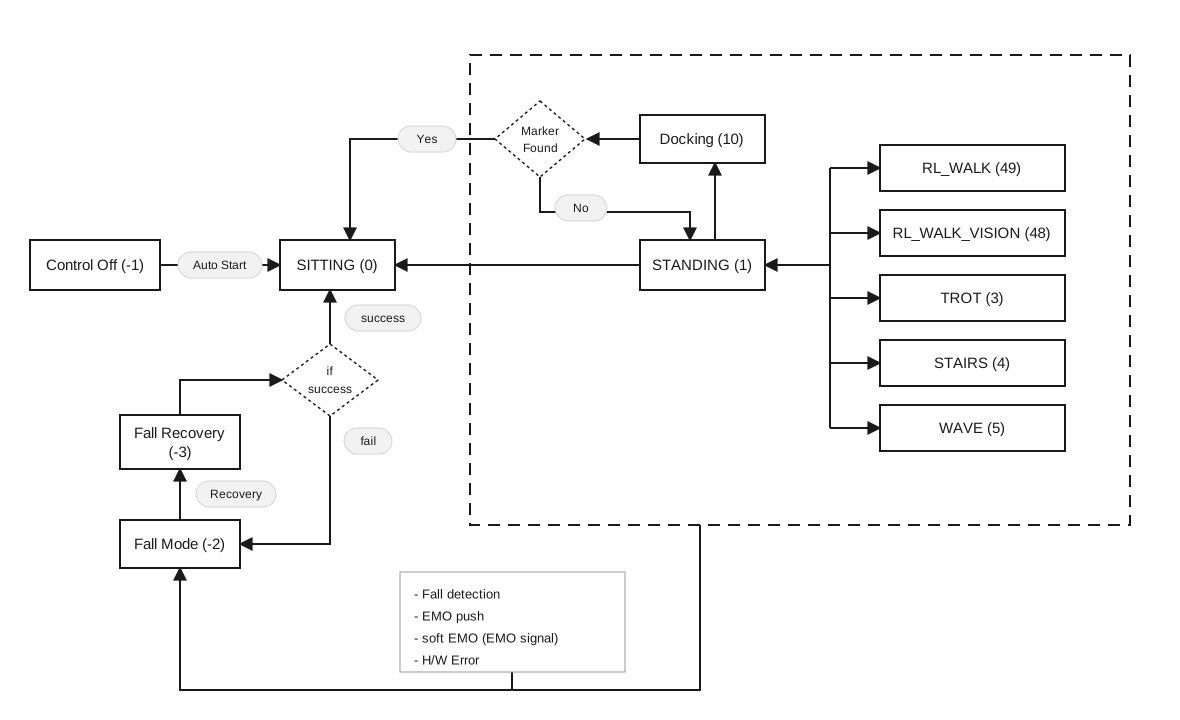
Gait state transition diagram

Commands available per gait state:

The second column shows commands available only in that state. Common commands and power control are always available regardless of gait state.

Gait StateMode-Specific CommandsCommon CommandsPower Control
Control Offrbq/motion/autoStartrbq/powerControl/setPortState
Sittingrbq/motion/canCheckrbq/motion/switchGait
rbq/motion/cmd_highLevel
rbq/motion/emergency
rbq/motion/staticLock
rbq/motion/staticReady
rbq/motion/staticGround
rbq/motion/switchControlMode
Standingrbq/motion/cmd_navigateTo
rbq/stateEstimation/comEstimationCompensation
rbq/motion/docking
rbq/motion/docking_mode
Walk / Stairs / Run / RL
Waverbq/motion/cmd_navigateTo
Fall Moderbq/motion/recoveryFlex
rbq/motion/switchGait (gait_id: 1)

High-Level Control

/rbq/motion/cmd_highLevel

FieldValue
Typerbq_msgs/HighLevelCommand
DirectionSub
DescriptionVelocity and posture command. Behavior and valid ranges depend on the current gait. Requires HighLevel mode (switchControlMode: true).

Fields:

FieldTypeUnitDescription
headerstd_msgs/HeaderROS header with timestamp
identifierstringOptional label for logging/tracking
rollfloat64degBody roll. Standing [-25, +25]
pitchfloat64degBody pitch. Standing [-20, +20], Walk (body tilt angle), RL Walk [-25, +25]
yawfloat64degBody yaw twist. Standing [-25, +25]
vel_xfloat64m/sForward speed. Walk [-1.0, +1.2] / Run [-1.0, +1.8] / RL Trot [-1.5, +2.0] / RL Walk [-1.5, +2.5] / Stairs [-1.0, +1.0]
vel_yfloat64m/sLateral speed. Walk [-0.4, +0.4] / Run [-0.6, +0.6] / RL Trot [-1.0, +1.0] / RL Walk [-1.0, +1.0] / Stairs [-0.4, +0.4]
omega_zfloat64deg/sYaw rate. Walk [-75, +75] / Stairs [-17, +17] / Wave [-20, +20] / RL Walk [-86, +86]
delta_body_hfloat64mBody height offset from default. Standing/Walk [-0.15, +0.05] / RL Walk [-0.25, +0.10]
delta_foot_hfloat64mSwing foot lift offset. [-0.06, +0.04]
gait_stateint8Target gait ID (see Gait State Reference)
gait_transitionbooltrue = transition to gait_state first, then apply command

Example commands:

bash
# Walk forward at 0.5 m/s (gait_id: 3 = TROTTING)
ros2 topic pub --once /rbq/motion/cmd_highLevel rbq_msgs/msg/HighLevelCommand \
'{header: {stamp: {sec: 0, nanosec: 0}, frame_id: "base"},
  identifier: "walk_fwd", roll: 0.0, pitch: 0.0, yaw: 0.0,
  vel_x: 0.5, vel_y: 0.0, omega_z: 0.0,
  delta_body_h: 0.0, delta_foot_h: 0.0,
  gait_state: 3, gait_transition: false}'

# Rotate in place at 30°/s
ros2 topic pub --once /rbq/motion/cmd_highLevel rbq_msgs/msg/HighLevelCommand \
'{header: {stamp: {sec: 0, nanosec: 0}, frame_id: "base"},
  identifier: "turn", roll: 0.0, pitch: 0.0, yaw: 0.0,
  vel_x: 0.0, vel_y: 0.0, omega_z: 30.0,
  delta_body_h: 0.0, delta_foot_h: 0.0,
  gait_state: 3, gait_transition: false}'

# Stop (zero velocity)
ros2 topic pub --once /rbq/motion/cmd_highLevel rbq_msgs/msg/HighLevelCommand \
'{header: {stamp: {sec: 0, nanosec: 0}, frame_id: "base"},
  identifier: "stop", roll: 0.0, pitch: 0.0, yaw: 0.0,
  vel_x: 0.0, vel_y: 0.0, omega_z: 0.0,
  delta_body_h: 0.0, delta_foot_h: 0.0,
  gait_state: 3, gait_transition: false}'

# Custom standing posture (roll: 15°, pitch: 30°, yaw: 20°)
ros2 topic pub --once /rbq/motion/cmd_highLevel rbq_msgs/msg/HighLevelCommand \
'{header: {stamp: {sec: 0, nanosec: 0}, frame_id: "base"},
  identifier: "standing_pose", roll: 15.0, pitch: 30.0, yaw: 20.0,
  vel_x: 0.0, vel_y: 0.0, omega_z: 0.0,
  delta_body_h: 0.0, delta_foot_h: 0.0,
  gait_state: 1, gait_transition: true}'

/rbq/motion/cmd_navigateTo

FieldValue
Typegeometry_msgs/PoseStamped
DirectionSub
DescriptionMove to an absolute world-frame pose. pose.position sets the target (x, y) in meters. pose.orientation sets the target yaw as a quaternion. Available in Standing and Wave modes.

/rbq/stateEstimation/comEstimationCompensation

FieldValue
Typestd_msgs/Char
DirectionSub
DescriptionTrigger CoM calibration in Standing mode. Searches along the X-axis to improve walking stability. Call after stand() before walking.

Robot Status

/rbq/status/robot_status

FieldValue
Typerbq_msgs/RobotStatus
DirectionPub
Hz50
DescriptionOverall robot status flags, gait state, and docking progress.

Fields:

FieldTypeDescription
headerstd_msgs/HeaderROS header
con_startboolMotor control enabled
ready_posboolRobot is in ready position
ground_posboolRobot is in ground/sitting position
force_conboolForce control mode active
ext_joyboolExternal joystick connected
is_standingboolRobot is physically standing
can_checkboolCAN communication verified
find_homeboolEncoder homing complete
gait_idint8Current gait (see Gait State Reference)
is_fallboolFall detected
docking_stateint8Docking progress (see table below)
imu_successboolIMU connected and operational

Docking State Values:

ValueConstantDescription
-6DOCKING_MAX_FAIL_CNT_REACHEDMax retry count (10×) reached — aborted
-5DOCKING_MARKER_POS_INVALID_ROTATIONMarker rotation > ±40° — aborted
-4DOCKING_MARKER_POS_INVALID_TOO_FARMarker > 5 m — aborted
-3DOCKING_MARKER_POS_INVALID_WRONG_DIRMarker detected on front side — aborted
-2DOCKING_MARKER_NOT_FOUNDMarker not found — aborted
-1DOCKING_FAILEDDocking failed — auto retry
0DOCKING_OPERATION_MODENormal operation (not docking)
1DOCKING_APPROACH_OFFSETStage 1: offset approach
2DOCKING_APPROACHStage 2: direct approach
3DOCKING_APPROACH_WIDEStage 3: wide-stance approach
4DOCKING_SIT_DOWNSitting down to connect
5DOCKING_SUCCESSDocked — charger physically connected
6DOCKING_SUCCESS_CHARGINGDocked and charging
7DOCKING_SUCCESS_NO_CHARGINGDocked but not charging

/rbq/status/comm_connected

FieldValue
Typestd_msgs/Bool
DirectionPub
Descriptiontrue when the communication module is connected to the robot.

State Estimation

/rbq/stateEstimation/odometry

FieldValue
Typenav_msgs/Odometry
DirectionPub
Hz50
DescriptionBody pose and velocity in the world frame. Origin resets at driver start. Fused from IMU and leg odometry.

/rbq/stateEstimation/robotVelocity

FieldValue
Typegeometry_msgs/VelocityStamped
DirectionPub
Hz50
DescriptionLinear and angular velocity expressed in the body frame. +X = forward, +Y = left, +Z = up.

/rbq/stateEstimation/footStates

FieldValue
Typerbq_msgs/FootStates
DirectionPub
Hz50
DescriptionFoot positions, velocities, and contact states for all 4 legs relative to the body center frame.

Fields:

FieldTypeDescription
headerstd_msgs/HeaderROS header
foot_position_rt_body[]geometry_msgs/Point[4]Foot position relative to body center. +X=forward, +Y=left, +Z=up
foot_velocity_rt_body[]geometry_msgs/Point[4]Foot velocity relative to body frame
contact[]uint8[4]Contact state: 0=Unknown, 1=Contact, 2=Lost
force[]float64[4]Estimated contact force [N]

Leg order: [0] = Hind-Right, [1] = Hind-Left, [2] = Front-Right, [3] = Front-Left


Sensor Feedback

/rbq/imu/IMU_state

FieldValue
Typesensor_msgs/Imu
DirectionPub
Hz200
DescriptionRaw IMU data. Sensor offset from body center: (0.00665, 0.0, -0.0404) m. Frame: +X = forward, +Y = left, +Z = up. Angular velocity range ±2000 °/s, acceleration range ±16 g.

/rbq/joint/joint_states

FieldValue
Typesensor_msgs/JointState
DirectionPub
Hz50
DescriptionJoint positions [rad], velocities [rad/s], and efforts [Nm] for all 12 joints in standard ROS format.

/rbq/joint/joint_status

FieldValue
Typerbq_msgs/JointStatus
DirectionPub
Hz50
DescriptionDetailed per-joint status: connection, temperature, motor error flags, gains, and process ownership. All arrays have 12 elements.

Joint order: [0]HRR [1]HRP [2]HRK [3]HLR [4]HLP [5]HLK [6]FRR [7]FRP [8]FRK [9]FLR [10]FLP [11]FLK

Fields:

FieldTypeUnitDescription
connected[]bool[12]CAN connection status
temperature[]int8[12]°CControl board temperature
motor_temp[]int8[12]°CMotor winding temperature
status_fetbool[12]FET driver ON
status_runbool[12]Control loop running
status_initbool[12]Initialization complete
status_jambool[12]JAM error (joint blocked)
status_curbool[12]Over-current error
status_bigbool[12]Large position error
status_tmpbool[12]Over-temperature error
status_ps1bool[12]Lower position limit reached
status_ps2bool[12]Upper position limit reached
position_ref[]float32[12]radReference (target) position
position_enc[]float32[12]radEncoder (measured) position
velocity[]float32[12]rad/sJoint angular velocity
torque_ref[]float32[12]NmReference torque
current[]float32[12]AMotor current
kp[]float32[12]Nm/radPosition gain
kd[]float32[12]Nm·s/radDamping gain
owner[]int32[12]Process ID owning each joint

Torque limits: Roll/Pitch ±104 Nm — Knee −70 / +140 Nm


Power Control

/rbq/powerControl/battery_status

FieldValue
Typerbq_msgs/BatteryState
DirectionPub
Hz10
DescriptionBattery voltage, current, charge percentage, temperatures, and status code.

Fields:

FieldTypeDescription
headerstd_msgs/HeaderROS header
identifierstringBattery identifier string
charge_percentagefloat64State of charge [0.0, 100.0] %
voltagefloat64Pack voltage [V]
currentfloat64Load current [A] (negative = discharging)
temperatures[]float64[]Temperature sensor readings [°C]
statusuint80=Unknown 1=Missing 2=Charging 3=Discharging 4=Booting

/rbq/powerControl/setPortState

FieldValue
Typestd_msgs/Int8MultiArray
DirectionSub
DescriptionToggle a PDU power port. data: [port_id, state]state: 1=ON, 0=OFF.

Port ID Reference:

port_idPort
0 (0x00)48 V — Leg actuators
1 (0x01)48 V — Add-on device (top)
2 (0x02)48 V — External port (top)
16 (0x10)12 V — Vision PC (internal)
17 (0x11)12 V — LAN comm port (top)
18 (0x12)12 V — LiDAR port (top)
19 (0x13)12 V — CCTV port (top)
20 (0x14)12 V — Thermal cam port (top)
21 (0x15)12 V — IR LED (front/rear panel)
22 (0x16)12 V — Speaker amplifier
32 (0x20)5 V — Camera USB hub
33 (0x21)5 V — Audio / side-cam USB hub
cpp
// PDU port ID enum (used as data[0] in setPortState)
enum PDU_PORT_IDs_e : unsigned char {
    PDU_PORT_48V_LEG                   = 0x00,  // Leg actuators
    PDU_PORT_48V_ADD                   = 0x01,  // Add-on device
    PDU_PORT_48V_EXT                   = 0x02,  // External port
    PDU_PORT_12V_VisionPC              = 0x10,  // Vision PC
    PDU_PORT_12V_COMM                  = 0x11,  // LAN comm port
    PDU_PORT_12V_Lidar                 = 0x12,  // LiDAR port
    PDU_PORT_12V_CCTV                  = 0x13,  // CCTV port
    PDU_PORT_12V_THER                  = 0x14,  // Thermal camera
    PDU_PORT_12V_IRLed                 = 0x15,  // IR LED
    PDU_PORT_12V_Speaker               = 0x16,  // Speaker amplifier
    PDU_PORT_5V_CAMERAS                = 0x20,  // Camera USB hub
    PDU_PORT_5V_AUDIO_SIDE_CAM_USBHUB  = 0x21,  // Audio/side-cam USB hub
};

Example: turn on 12V LiDAR port (PDU_PORT_12V_Lidar = 0x12 → decimal 18)

bash
ros2 topic pub --once /rbq/powerControl/setPortState std_msgs/msg/Int8MultiArray "{data: [18, 1]}"

Vision — Camera Sensors

All camera topics are published by the robot (Pub). Each sensor provides raw images, compressed images, and calibration info.

Bottom Cameras — sensor_bottom_{N} (N = 0, 1, 2, 3)

Four downward-facing depth sensors mounted under the robot body.

FieldValue
Typesensor_msgs/Image · sensor_msgs/CompressedImage · sensor_msgs/CameraInfo
DirectionPub
DescriptionDepth and IR streams from each bottom sensor. Replace {N} with 03.
TopicTypeDescription
/rbq/vision/sensor_bottom_{N}/depthsensor_msgs/ImageRaw 16-bit depth image (mm, 16UC1)
/rbq/vision/sensor_bottom_{N}/depth/compressedsensor_msgs/CompressedImageCompressed depth
/rbq/vision/sensor_bottom_{N}/depth/camera_infosensor_msgs/CameraInfoDepth intrinsics + distortion
/rbq/vision/sensor_bottom_{N}/irsensor_msgs/ImageRaw IR image
/rbq/vision/sensor_bottom_{N}/ir/compressedsensor_msgs/CompressedImageCompressed IR
/rbq/vision/sensor_bottom_{N}/ir/camera_infosensor_msgs/CameraInfoIR intrinsics + distortion

Front Camera — sensor_front

FieldValue
Typesensor_msgs/Image · sensor_msgs/CompressedImage · sensor_msgs/CameraInfo
DirectionPub
DescriptionRGB, IR, and Depth streams from the front-facing RGB-D sensor.
TopicTypeDescription
/rbq/vision/sensor_front/rgbsensor_msgs/ImageRaw RGB image
/rbq/vision/sensor_front/rgb/compressedsensor_msgs/CompressedImageCompressed RGB
/rbq/vision/sensor_front/rgb/camera_infosensor_msgs/CameraInfoRGB intrinsics
/rbq/vision/sensor_front/irsensor_msgs/ImageRaw IR image
/rbq/vision/sensor_front/ir/compressedsensor_msgs/CompressedImageCompressed IR
/rbq/vision/sensor_front/ir/camera_infosensor_msgs/CameraInfoIR intrinsics
/rbq/vision/sensor_front/depthsensor_msgs/ImageRaw 16-bit depth image
/rbq/vision/sensor_front/depth/compressedsensor_msgs/CompressedImageCompressed depth
/rbq/vision/sensor_front/depth/camera_infosensor_msgs/CameraInfoDepth intrinsics

Rear Camera — sensor_rear

FieldValue
Typesensor_msgs/Image · sensor_msgs/CompressedImage · sensor_msgs/CameraInfo
DirectionPub
DescriptionRGB, IR, and Depth streams from the rear-facing RGB-D sensor. Also used for ArUco marker detection during docking.
TopicTypeDescription
/rbq/vision/sensor_rear/rgbsensor_msgs/ImageRaw RGB image
/rbq/vision/sensor_rear/rgb/compressedsensor_msgs/CompressedImageCompressed RGB
/rbq/vision/sensor_rear/rgb/camera_infosensor_msgs/CameraInfoRGB intrinsics
/rbq/vision/sensor_rear/irsensor_msgs/ImageRaw IR image
/rbq/vision/sensor_rear/ir/compressedsensor_msgs/CompressedImageCompressed IR
/rbq/vision/sensor_rear/ir/camera_infosensor_msgs/CameraInfoIR intrinsics
/rbq/vision/sensor_rear/depthsensor_msgs/ImageRaw 16-bit depth image
/rbq/vision/sensor_rear/depth/compressedsensor_msgs/CompressedImageCompressed depth
/rbq/vision/sensor_rear/depth/camera_infosensor_msgs/CameraInfoDepth intrinsics

PTZ Camera

/rbq/ptzCamera/setPanTiltZoom

FieldValue
Typestd_msgs/Float32MultiArray
DirectionSub
DescriptionPTZ camera control. data: [pan, tilt, zoom]. Pan and Tilt in degrees. Zoom is a scale factor (1.0 = 1×).

TF & Navigation

/tf

FieldValue
Typetf2_msgs/TFMessage
DirectionPub
DescriptionDynamic transforms broadcast at runtime: odom → base_link, body → leg links, body → sensor frames.

/tf_static

FieldValue
Typetf2_msgs/TFMessage
DirectionPub
DescriptionStatic transforms from the URDF: fixed sensor mount offsets and rigid link relationships. Published once on startup.

/joy

FieldValue
Typesensor_msgs/Joy
DirectionSub
DescriptionJoystick input passthrough to the robot in Joystick mode. Axes [0–5]: left-X, left-Y, right-X, right-Y, L2, R2. Buttons [0–15].

Topic Subscription Examples

bash
# Robot status (50 Hz)
ros2 topic echo --once /rbq/status/robot_status

# Joint status (50 Hz)
ros2 topic echo --once /rbq/joint/joint_status

# IMU data (200 Hz)
ros2 topic echo --once /rbq/imu/IMU_state

# Battery state (10 Hz)
ros2 topic echo --once /rbq/powerControl/battery_status

# Foot contact states (50 Hz)
ros2 topic echo --once /rbq/stateEstimation/footStates

# Odometry (50 Hz)
ros2 topic echo --once /rbq/stateEstimation/odometry

This user manual is intended for RBQ users.