4. Basic Motion Command
Goal: Use RBQGUI and the joystick to command the robot through its basic motion modes.
Prerequisites: Auto Start must be completed (all items green).
DANGER
Keep all people and animals at least 2 m away from the robot before and during operation. Never touch the robot while it is moving.
Sit Mode
The robot lowers itself into a stable seated position. Joystick input is ignored in this state.
Use Sit to safely place the robot down before packing, charging, or any pause in operation.
Stance Mode
- If currently sitting → the robot stands up.
- If currently walking or in stair mode → the robot stops and stands in place.
| Joystick | Input | Robot Action |
|---|---|---|
| L Stick | Forward / Backward | Nose up / down (pitch) |
| L Stick | Left / Right | Roll left / right |
| R Stick | Forward / Backward | Body height up / down |
| R Stick | Left / Right | Turn left / right |
Walk Mode
The robot walks in the direction commanded by the joystick.
| Joystick | Input | Robot Action |
|---|---|---|
| L Stick | Forward / Backward | Move forward / backward |
| L Stick | Left / Right | Strafe left / right |
| R Stick | Forward / Backward | Pitch forward / backward |
| R Stick | Left / Right | Turn left / right |
Stair Mode
The robot adjusts its walking speed and body lean angle automatically based on the slope of stairs.
NOTE
In Stair mode, the R Stick Forward/Backward input is not used.
| Joystick | Input | Robot Action |
|---|---|---|
| L Stick | Forward / Backward | Move forward / backward |
| L Stick | Left / Right | Strafe left / right |
| R Stick | Left / Right | Turn left / right |
Docking Mode
The robot autonomously aligns itself with the docking station and initiates charging once docked.
CAUTION
Do not manually move the robot while Docking Mode is active. Ensure the docking station is properly positioned and powered before activating this mode.
RL (Vision Trot) Mode
The robot uses a vision-based reinforcement learning policy to walk. The policy responds dynamically to terrain using the onboard camera, making it suitable for uneven or unpredictable surfaces.
| Joystick | Input | Robot Action |
|---|---|---|
| L Stick | Forward / Backward | Move forward / backward |
| L Stick | Left / Right | Strafe left / right |
| R Stick | Left / Right | Turn left / right |
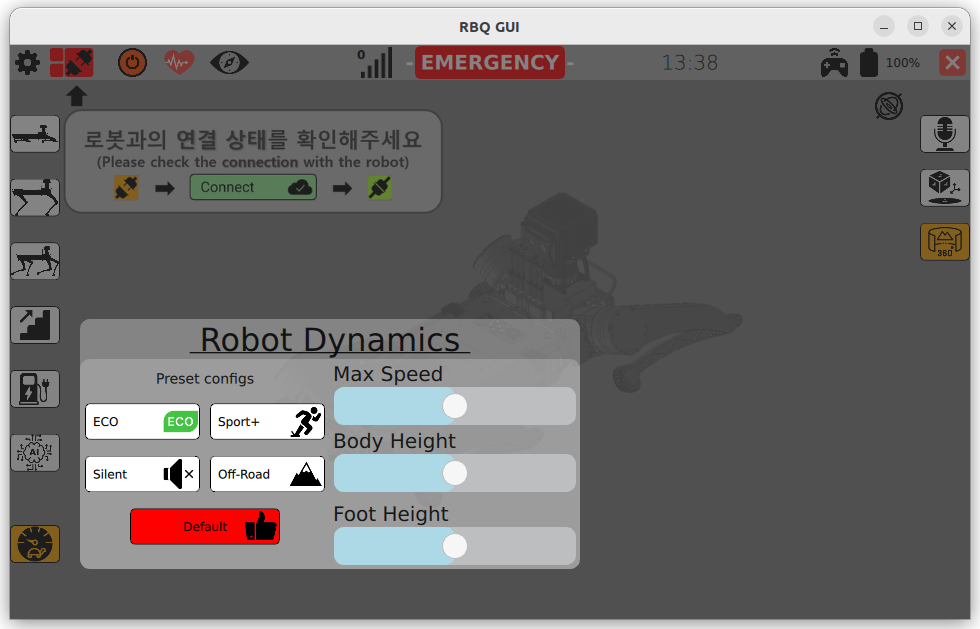
Walking Parameter Settings
You can fine-tune the robot's walking behavior in real time from the GUI.

| Parameter | Description |
|---|---|
| Max Command Speed | Limits the maximum walking speed |
| Body Height | Adjusts the robot's vertical posture for terrain clearance |
| Foot Height | Controls how high the feet lift during the swing phase |
Next Step
Check the robot's real-time sensor and system state: