Basic Motion Command
Sit Mode
The robot will maintain the sit posture. Any joystick operation will not be working.
Stance Mode
- currently Sitting -> stand up
- currently Walking or Stair mode -> stop & stand in place
Joystick Operation
| 🕹️ Joystick | Command | Robot Action |
|---|---|---|
| L Stick | Forward / Backward | Nose up / down |
| L Stick | Left / Right | Roll Left / Right |
| R Stick | Forward / Backward | Height up / down |
| R Stick | Left / Right | Turn Left / Right |
Walk Mode
Joystick Operation
| 🕹️ Joystick | Command | Robot Action |
|---|---|---|
| L Stick | Forward / Backward | Go Forward / Backward |
| L Stick | Left / Right | Go Left / Right |
| R Stick | Forward / Backward | Pitch Forward / Backward |
| R Stick | Left / Right | Turn Left / Right |
Stair Mode
In stair mode, the robot adjusts the walking speed and leans the body according to the slope of the stairs.
NOTE
When the robot is in stair mode,
R Stick - Forward / Backward control keys are not used.
Joystick Operation
| 🕹️ Joystick | Command | Robot Action |
|---|---|---|
| L Stick | Forward / Backward | Go Forward / Backward |
| L Stick | Left / Right | Go Left / Right |
| R Stick | Forward / Backward | |
| R Stick | Left / Right | Turn Left / Right |
Docking Mode
In this mode, the robot autonomously aligns itself with the charging station.
🤖 The robot will stop any locomotion and begin charging once docked.
⚠️ Do not manually move the robot while in docking mode.
Ensure the docking station is properly positioned and powered.
RL (Vision Trot) Mode
In this mode, the robot uses a vision-based Reinforcement Learning policy to walk. It is trained to respond dynamically to terrain using onboard camera input.
Ideal for uneven terrain or dynamic obstacles.
May have different responsiveness compared to manually programmed gait modes.
Joystick Operation
| 🕹️ Joystick | Command | Robot Action |
|---|---|---|
| L Stick | Forward / Backward | Go Forward / Backward |
| L Stick | Left / Right | Go Left / Right |
| R Stick | Forward / Backward | |
| R Stick | Left / Right | Turn Left / Right |
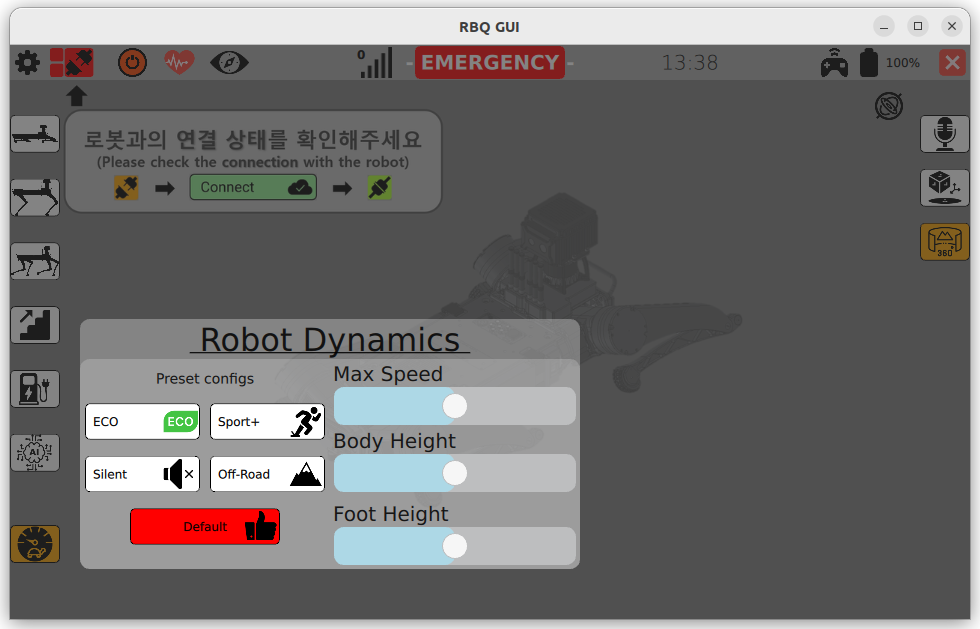
Walking Parameter Setting
Customize Your Robot’s Gait in Real Time
You can fine-tune the walking behavior via the GUI:
Max Command Speed - Limits how fast the robot walks
Body Height - Adjust vertical posture for clearance
Foot Height - Controls how high the feet lift during swing phase