
Mechanical Safety
Measures to prevent injury or damage from joints, legs, and drive components.
Motion envelope and access
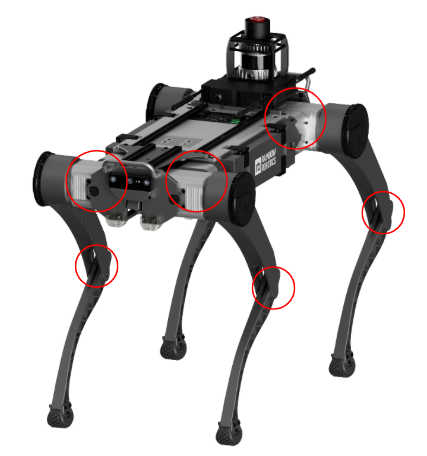
Red circles in the figure mark hazard zones with pinch and collision risk (around hip and leg joints). During handling, transport, and inspection, do not put fingers, clothing, cables, long hair, or jewelry into these zones.
WARNING
1) Do not enter the motion envelope or put hands or body on the robot body or legs while it is moving-risk of pinch and collision.
2) If the robot falls or corrects posture, people or objects nearby can be struck-maintain sufficient clear space.
Locomotion and speed
- Walking: The RBQ moves on four legs. Observe speed, acceleration, and load limits in the manual and GUI. Speed changes take effect immediately; actual speed depends on floor friction, commands, balance correction, and faults.
- Stay within limits: Overload or excessive speed can cause failure or unstable motion. Collisions with objects can release large kinetic energy-apply safety settings suited to the environment.
Joints, legs, and pinch risk
- Pinch points: Mainly around hip and leg joints. During normal driving, hands usually cannot reach them, but during handling, transport, and inspection, keep fingers, clothing, cables, hair, and jewelry clear.
- If something is wrong: Stop immediately, trigger emergency stop, find the cause, then continue.
Stairs, slopes, and uneven floors
CAUTION
On stairs or uneven surfaces the robot will try to adjust posture; you cannot eliminate all errors. Do not use sudden manual intervention or force the robot to stop. Limit approach distance and speed on stairs and slopes; keep about 2 m clearance if needed.
Installation and movement
- Flat floor: Use the robot on a flat, stable floor per specifications. It can fall on slopes or slippery surfaces.
- Handling and transport: Follow the procedures for moving, packing, and shipping. See Handling and Transportation.