Skip to content

GNSS · RTK (satellite positioning) ​

With a GNSS receiver attached, the robot passes satellite positioning data through as raw NMEA sentences. The robot's GPS program reads the sentences from the receiver and republishes them unchanged on a ROS 2 topic.

NOTE

GNSS needs robot software that includes the GPS program and a GNSS receiver. For receivers and the LTE/GPS module see Accessories.

Topic ​

ItemValue
Topic/rbq/gps/nmea
Typenmea_msgs/Sentence
DirectionPub (robot → client)

The message has just two fields.

FieldContents
header.stampThe time the robot read the sentence (not the UTC inside it)
header.frame_idgps — the receiver (antenna) frame
sentenceOne raw NMEA 0183 line (starts with $, checksum included)

Sentences are not processed. Parsing is left to the subscriber; NMEA is a standard format with parsers in most languages.

bash
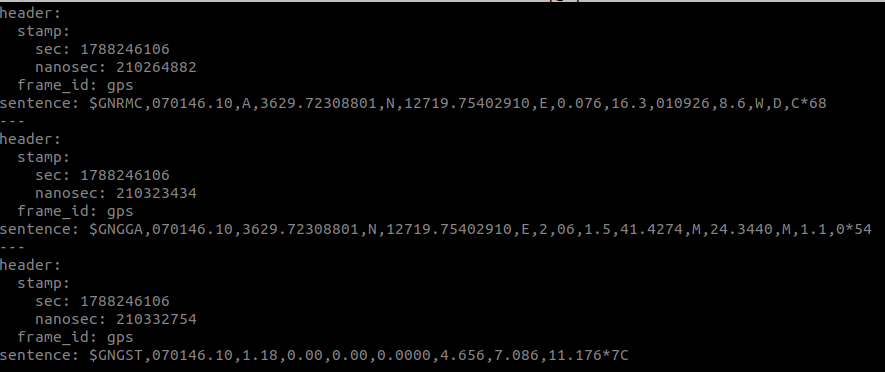
ros2 topic echo /rbq/gps/nmea
ros2 topic echo /rbq/gps/nmea output showing GNRMC, GNGGA and GNGST sentences
[ Live output — the three sentences arrive in sequence each cycle ]

The three sentences ​

Of everything the receiver emits, only these three types are published; the rest are dropped. The GN prefix means the fix combines several constellations (GPS, GLONASS, Galileo, BeiDou).

$GNRMC — position, speed, time ​

$GNRMC,<UTC time>,<status>,<latitude>,<N/S>,<longitude>,<E/W>,<speed>,<course>,<UTC date>,<magnetic variation>,<E/W>,<mode>,<nav status>*<checksum>
FieldContents
UTC time · dateWhen the fix was taken
StatusData valid (A) or not (V)
Latitude · longitudePosition
SpeedSpeed over ground (knots)
CourseHeading, relative to true north
Magnetic variationDifference between true and magnetic north
Mode · nav statusHow the position was determined, and the navigation status

$GNGGA — fix quality and altitude ​

$GNGGA,<UTC time>,<latitude>,<N/S>,<longitude>,<E/W>,<fix quality>,<satellites>,<HDOP>,<altitude>,M,<geoid separation>,M,<DGPS age>,<station ID>*<checksum>
FieldContents
Fix qualityThis is where you check the RTK state — see the table below
SatellitesNumber of satellites used for the fix
HDOPHorizontal dilution of precision — lower is better
AltitudeAbove mean sea level
Geoid separationDifference between the ellipsoid and the geoid
DGPS age · station IDHow long since the last correction (RTCM) and which base station sent it

The fix-quality values are NMEA 0183 standard.

ValueMeaning
0No fix
1Standalone GPS fix
2DGPS — corrections applied
4RTK fixed — integer ambiguities resolved, the most accurate
5RTK float — ambiguities not resolved

$GNGST — position error estimates ​

$GNGST,<UTC time>,<RMS>,<semi-major σ>,<semi-minor σ>,<orientation>,<latitude σ>,<longitude σ>,<altitude σ>*<checksum>
FieldContents
RMSRMS of the range residuals
Semi-major · semi-minor σ · orientationStandard deviations and bearing of the error ellipse
Latitude · longitude · altitude σPer-axis position error standard deviation (m)

This sentence is how you judge what RTK actually bought you. Once the latitude and longitude σ drop to centimetre level, RTK has locked in.

Checking that it works ​

  1. Is the topic flowing? — run ros2 topic echo /rbq/gps/nmea and watch for sentences.
  2. Is there a fix? — a fix quality of 0 in $GNGGA means no satellites yet. Move somewhere with open sky and wait a moment.
  3. Is RTK locked? — check that the fix quality is 4 (fixed) or 5 (float), and that the latitude and longitude σ in $GNGST are small enough.

In Logs → Real Time, filtering down to the GPS process shows the connect and disconnect messages directly.

When it does not work ​

SymptomCause and fix
Nothing arrives on the topicCheck that the receiver is attached and powered, and that the robot can reach its address
It connects but no sentences appearAnything outside GNRMC, GNGGA and GNGST is dropped. Enable those sentences in the receiver's own configuration
Fix quality never rises above 1No corrections (RTCM) are arriving. Check the DGPS age and station ID in $GNGGA
No fix indoorsGNSS needs a view of the sky. Indoors or between tall buildings there may be no fix, or a large error

Still stuck ​

Tell us the receiver model and a few lines of ros2 topic echo /rbq/gps/nmea output.

→ Support

This user manual is intended for RBQ users.