Driver Package
Related repository: rby1_ros2 on GitHub
Overview
rby1_ros2 is a unified ROS 2 driver package for controlling the Rainbow Robotics RBY1 robot.
It wraps the RBY1 C++ SDK into a ROS 2 node, providing state monitoring and multiple control modes (Joint Position, Cartesian Position, Impedance, Gravity Compensation, and Trajectory Streaming) through a clean action/service/topic interface.
ROS 2 version: Humble
OS: Ubuntu 22.04
SDK compatibility: rby1-sdk
0.10.xand later
1-1. Configure driver_parameters.yaml
Located at rby1_driver/config/driver_parameters.yaml.
Edit this file to match your robot before launching the driver.
Because the workspace was built with --symlink-install, no rebuild is needed after editing.
[!IMPORTANT] For simulation testing, keep
robot_ip: "127.0.0.1:50051".
Some state values (battery, tool flange FT/IMU) will show zeros in simulation because no physical sensors are attached.
Parameter |
Default |
Description |
|---|---|---|
|
|
Robot IP address and gRPC port |
|
|
Robot model — |
|
|
Fixed default namespace prefix for all state topics |
|
|
Fixed default action server name for joint position commands |
|
|
Fixed default action server name for Cartesian commands |
|
|
State publish interval (seconds) — default 100 Hz |
|
|
Default minimum execution time for motion commands (seconds) |
|
|
Joint angular velocity limit (rad/s) |
|
|
Cartesian linear velocity limit (m/s) |
|
|
Acceleration scaling factor |
|
|
Minimum execution time (interpolation ramp) for SE2 velocity commands (seconds) |
|
|
Linear acceleration limit for SE2 velocity commands |
|
|
Angular acceleration limit for SE2 velocity commands |
|
|
Auto-reset MAJOR/MINOR fault on driver startup |
|
|
Power off robot automatically when driver node exits |
|
|
Enable self-collision detection |
|
|
Collision detection distance threshold (meters) |
|
|
Enable battery state topic |
|
|
Enable tool flange state topics (left + right) |
1-2. Run Simulator (optional)
If you do not have a physical robot, run the Docker simulator.
The robot IP in this case is "127.0.0.1:50051" or "localhost:50051".
Change the tag at the end to select a model/version (e.g. a_v1.2, m_v1.3).
# Example: Model A, firmware v1.2
sudo docker run --rm \
  -e DISPLAY=${DISPLAY} \
  -v /tmp/.X11-unix:/tmp/.X11-unix \
  -p 50051:50051 \
  rainbowroboticsofficial/rby1-sim:0.10.6-a_v1.2
[!IMPORTANT]
Model
aonly supports firmware up to v1.2. Modelmsupports v1.0–v1.3.
1-3. Launch the Driver
# In your workspace root
source install/setup.bash

# Option A: Launch normally
ros2 launch rby1_driver rby1_ros2_driver.launch.py

# Option B: Launch with a custom namespace (topic names remain relative)
ros2 launch rby1_driver rby1_ros2_driver.launch.py namespace:=my_robot
1-4. Run Examples
Each example can be run in a separate terminal while the driver is active:
source install/setup.bash
ros2 run rby1_examples <example_name>
Example |
Command |
Description |
|---|---|---|
|
|
Full power lifecycle: Power ON/OFF, Servo ON/OFF |
|
|
Releases and re-engages arm brakes via IDLE state |
|
|
Comprehensive state monitor (CM state, brakes, battery, FT) |
|
|
Continuously prints tool flange FT/IMU/IO data |
|
|
Prints per-component joint positions in real time |
|
|
Enables gravity compensation (direct teaching) mode |
|
|
Moves all joints to 0 rad simultaneously |
|
|
Sends Ready Pose → Zero Pose via joint position action |
|
|
Moves the right arm to a target Cartesian pose |
|
|
Simultaneous joint + Cartesian control per body part |
|
|
Streams a pre-computed trajectory via persistent command streams |
|
|
Demonstrates action cancel and Trigger service cancel |
|
|
Drives robot wheels via relative cmd_vel Twists |
|
|
Alternates Zero/Ready poses using regular joint commands over persistent stream with varying wait intervals |
2. Package Structure
Package |
Role |
|---|---|
|
C++ main driver node. Wraps the RBY1 SDK and exposes a ROS 2 interface. |
|
Custom message, service, and action definitions for robot control and state. |
|
Python example scripts demonstrating all major driver features. |
|
Robot description for ROS, demonstrating URDF and Mesh files, and simple visualization launch file. |
3. System Architecture

[User Node / Example]
        │
   ROS 2 Topics / Services / Actions
        │
  ┌─────▼────────────────────┐
  │   rby1_ros2_driver (C++) │
  │  ┌────────────────────┐  │
  │  │   State Publisher  │  │  ← reads robot state via SDK, publishes ROS topics
  │  ├────────────────────┤  │
  │  │  Service Handlers  │  │  ← power, servo, brake, gravity comp, CM commands
  │  ├────────────────────┤  │
  │  │  Action Servers    │  │  ← joint commands, Cartesian commands, streaming
  │  └────────────────────┘  │
  └─────────────────┬────────┘
                    │ gRPC
             ┌──────▼──────┐
             │  RBY1 Robot │
             │  (or Sim)   │
             └─────────────┘
Key internal components:
State Loop: Calls
GetState()andGetControlManagerState()atget_state_periodintervals and publishes all state topics.Action Executors: Each action goal is translated into an SDK
CommandBuildercommand and executed synchronously. Minor faults during execution trigger automatic reset and recovery.Safety Guard: All motion commands are rejected unless the Control Manager is in
ENABLEorEXECUTINGstate.Collision Detection: When
collision_enable: true, self-collision is monitored andCancelControl()is called automatically if distance falls belowcollision_threshold.
4. Control Manager States
The RobotState.control_manager_state field (and the robot_state topic) uses the following integer constants, also accessible as RobotState.STATE_*:
Value |
Constant |
Description |
|---|---|---|
|
|
Driver not initialized or disconnected |
|
|
Control Manager is disabled (IDLE). Safe for brake operations. |
|
|
Control Manager is active and holding position |
|
|
A motion command is currently being executed |
|
|
Unrecoverable hardware fault — requires reset |
|
|
Recoverable fault — driver auto-resets by default |
5. Communication Interfaces
5-1. Topics (Publishers)
Topic |
Type |
Always Active |
Description |
|---|---|---|---|
|
|
✅ |
Torso joint positions, velocities, torques |
|
|
✅ |
Right arm joint state |
|
|
✅ |
Left arm joint state |
|
|
✅ |
Head joint state |
|
|
✅ |
Control Manager state, brakes, EMO, CoM, tool flange connection |
|
|
⚙️ |
Battery voltage, current, percentage |
|
|
⚙️ |
Left flange: FT sensor, IMU, switch, voltage, digital I/O |
|
|
⚙️ |
Right flange: FT sensor, IMU, switch, voltage, digital I/O |
|
|
✅ |
High-rate robot odometry and TF broadcast relative to node namespace |
5-2. Topics (Subscribers)
Topic |
Type |
Description |
|---|---|---|
|
|
Velocity command for driving base wheels (linear x, y and angular z) |
[!IMPORTANT] Mobile Base Control (
cmd_vel) streaming requirement: Sincecmd_velacts as a high-frequency publisher, you must enable persistent stream control before publishing base velocity commands.
Call
/stream_controlwithstate: truebefore sendingcmd_velcommands.Call
/stream_controlwithstate: falseafter finishing base control to return to regular position hold.Attempting to activate
/stream_controlwhen already active is idempotent; the service will safely log a warning and return success.⚙️ = controlled by the corresponding flag in
driver_parameters.yaml
5-3. Services
Service |
Type |
Description |
|---|---|---|
|
|
Power ON/OFF. |
|
|
Servo ON/OFF. |
|
|
Set tool flange voltage. |
|
|
Enable/disable gravity compensation per body part |
|
|
Cancel all active motion commands immediately |
|
|
Query Cartesian transform between two links |
|
|
Send |
|
|
Engage ( |
|
|
Enable/disable persistent streaming mode with 10-minute hold times ( |
ControlManagerCommand constants
Constant |
Value |
Description |
|---|---|---|
|
|
No operation |
|
|
Enable the Control Manager (start position hold) |
|
|
Disable the Control Manager (transition to IDLE) |
|
|
Reset MAJOR/MINOR fault and return to IDLE |
5-4. Action Servers
Action Server |
Type |
Description |
|---|---|---|
|
|
Whole-body joint position command. Each body part (torso, right_arm, left_arm, head) can be commanded independently in a single goal. |
|
|
Whole-body Cartesian command. Each arm and torso can be assigned an . geometry_msgs/msg/Transform.msg (position, quaternion) |
|
|
Streams a full |
[!IMPORTANT] The action server names (
robot_joint,robot_cartesian) are configured viajoint_position_topic_nameandcartesian_position_topic_nameindriver_parameters.yaml.
6. Custom Message Types
rby1_msgs/JointCommand (used inside Rby1JointCommand goals)
Field |
Type |
Default |
Description |
|---|---|---|---|
|
|
— |
Optional joint name list |
|
|
— |
Target joint positions (rad) |
|
|
|
Minimum execution time (s) |
|
|
|
Joint velocity limit (rad/s) |
|
|
|
Acceleration scaling |
|
|
|
Use joint impedance instead of position control |
|
|
— |
Impedance stiffness coefficients |
|
|
|
Impedance damping ratio |
|
|
|
Impedance torque safety limit (N·m) |
rby1_msgs/CartesianCommand (used inside Rby1CartesianCommand goals)
Field |
Type |
Description |
|---|---|---|
|
|
Name of the end-effector link to control |
|
|
Reference coordinate frame link |
|
|
Row-major 4×4 homogeneous transform matrix |
|
|
Minimum execution time (s) |
|
|
Use Cartesian impedance instead of position control |
rby1_msgs/RobotState
Field |
Type |
Description |
|---|---|---|
|
|
Current Control Manager state (see constants above) |
|
|
Brake engagement per joint (left_arm[], right_arm[], torso[], head[]) |
|
|
Tool flange connection status |
|
|
Emergency Stop pressed status |
|
|
Calculated CoM position |
rby1_msgs/ToolFlangeState
Field |
Type |
Description |
|---|---|---|
|
|
Force |
|
|
Torque |
|
|
Gyroscope |
|
|
Accelerometer |
|
|
Physical switch A state |
|
|
Output voltage in millivolts |
|
|
Digital input A/B state |
|
|
Digital output A/B state |
7. Key Features
Robot Control
Joint Position Control: Command each body part (Torso, Right/Left Arm, Head) to target joint angles (rad) via the
robot_jointaction. All parts can be commanded simultaneously in one goal.Cartesian Position Control: Command end-effector pose as a 4×4 SE3 transform via the
robot_cartesianaction.Impedance Control: Both joint and Cartesian modes support impedance control with configurable stiffness and damping.
Gravity Compensation: Enables back-drivable joints for direct teaching; the driver continuously compensates gravity.
Trajectory Streaming: Send a pre-computed
JointTrajectory(multi-waypoint) via thestream_position_commandaction.
State Monitoring
Joint states (position, velocity, torque) are published at up to 100 Hz per body part.
A unified
robot_statetopic provides Control Manager state, brake status, EMO, and CoM in one message.Optional battery state and per-flange FT/IMU data can be enabled in
driver_parameters.yaml.
Safety & Fault Management
Motion commands are rejected if the Control Manager is not in
ENABLEorEXECUTINGstate.Minor faults encountered during execution are automatically reset and control is resumed.
Self-collision detection (optional): automatically calls
CancelControl()when link distance falls belowcollision_threshold.Brake operations are only allowed in
STATE_IDLEto prevent mechanical damage.
8. Notes & Known Limitations
Simulator: Battery voltage, FT sensor, and IMU data read as
0.0in simulation (no physical hardware).Tool flange topics require
publish_tool_flange_state: trueindriver_parameters.yaml.Brake control requires the Control Manager to be in
STATE_IDLE. As an extra mechanical safety measure, brake commands are strictly rejected if 48V power is active (to prevent disengaging/engaging mechanical brakes while joints are powered). Thebrake_controlexample handles these states automatically.The
trajectory_joint_commandexample currently usesStreamPositiononly.
9. rby1_description
You can use the robot’s basic TF structure and state publisher through the commands below. When implementing features related to rby1, please use the model files from the corresponding package.
parameter
model_name :rby1a , rby1m
model_version
rby1a : 1.0, 1.1, 1.2
rby1m : 1.0, 1.1, 1.2, 1.3
source install/setup.bash
ros2 launch rby1_description rby1_state_publisher.launch.py model:=a version:=1_1
if you launch this command, you can see the following window
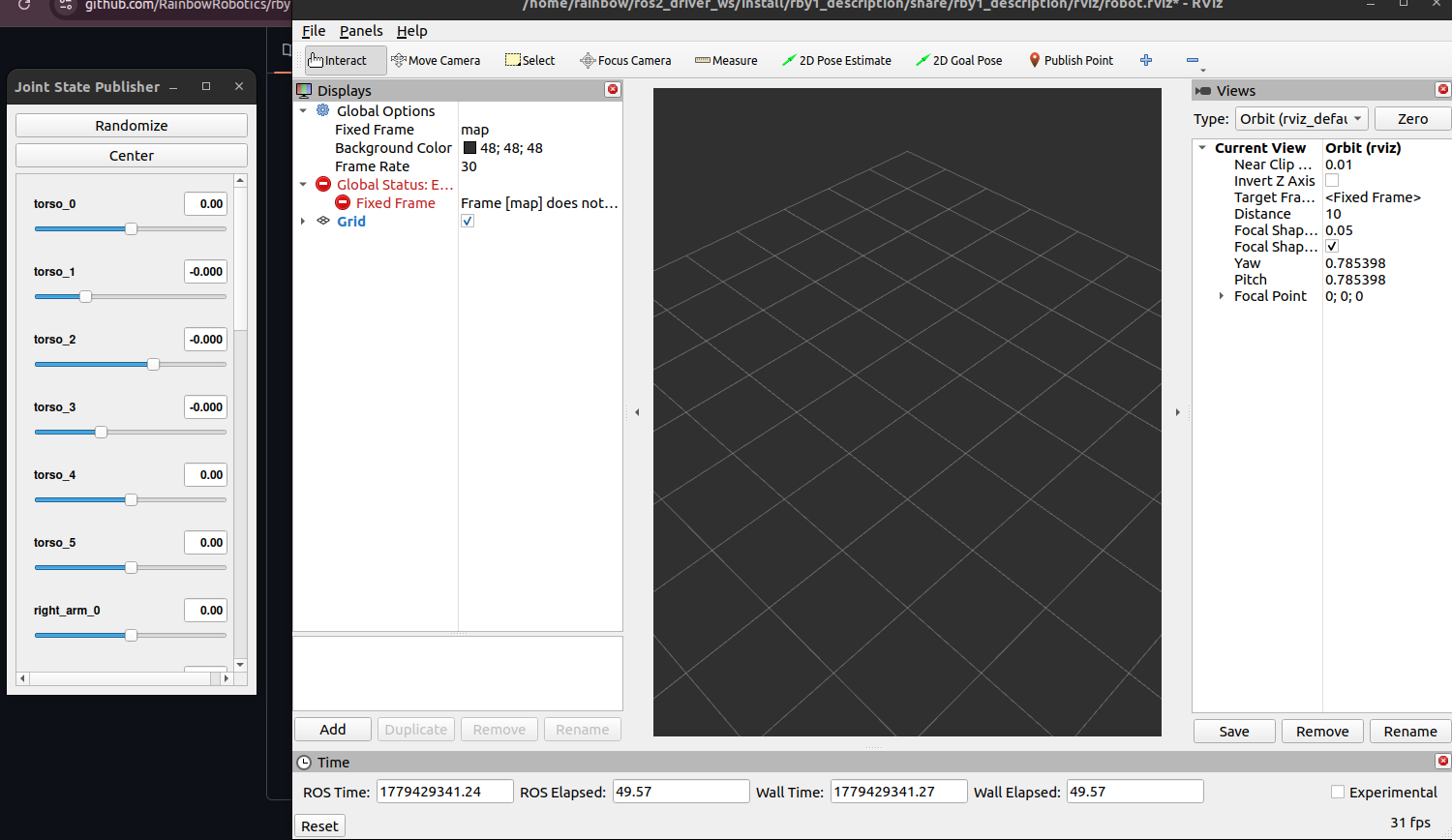
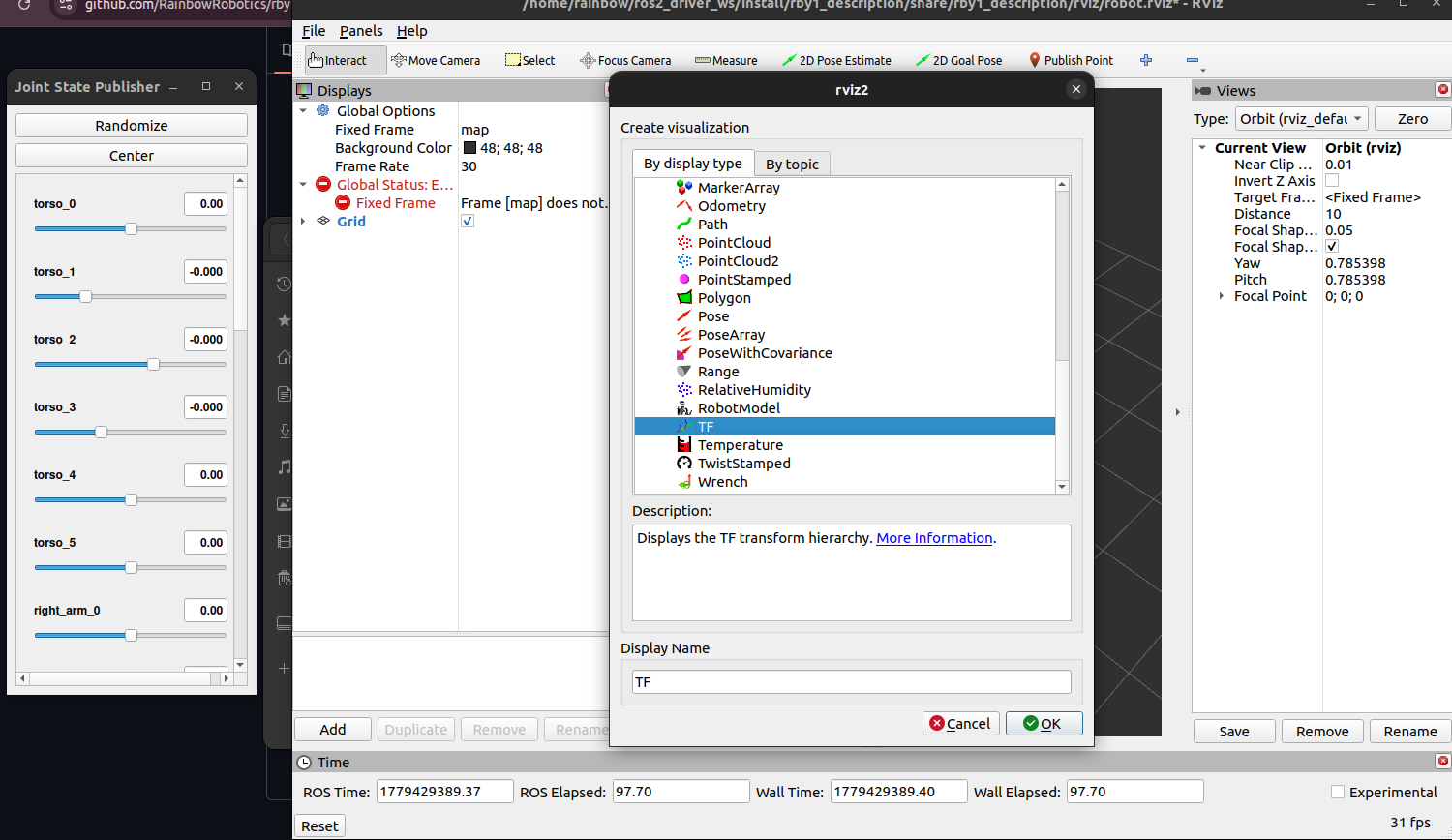
click ‘Add’, and add plugin
TF,RobotModel
click Fixed Frame and set to
base
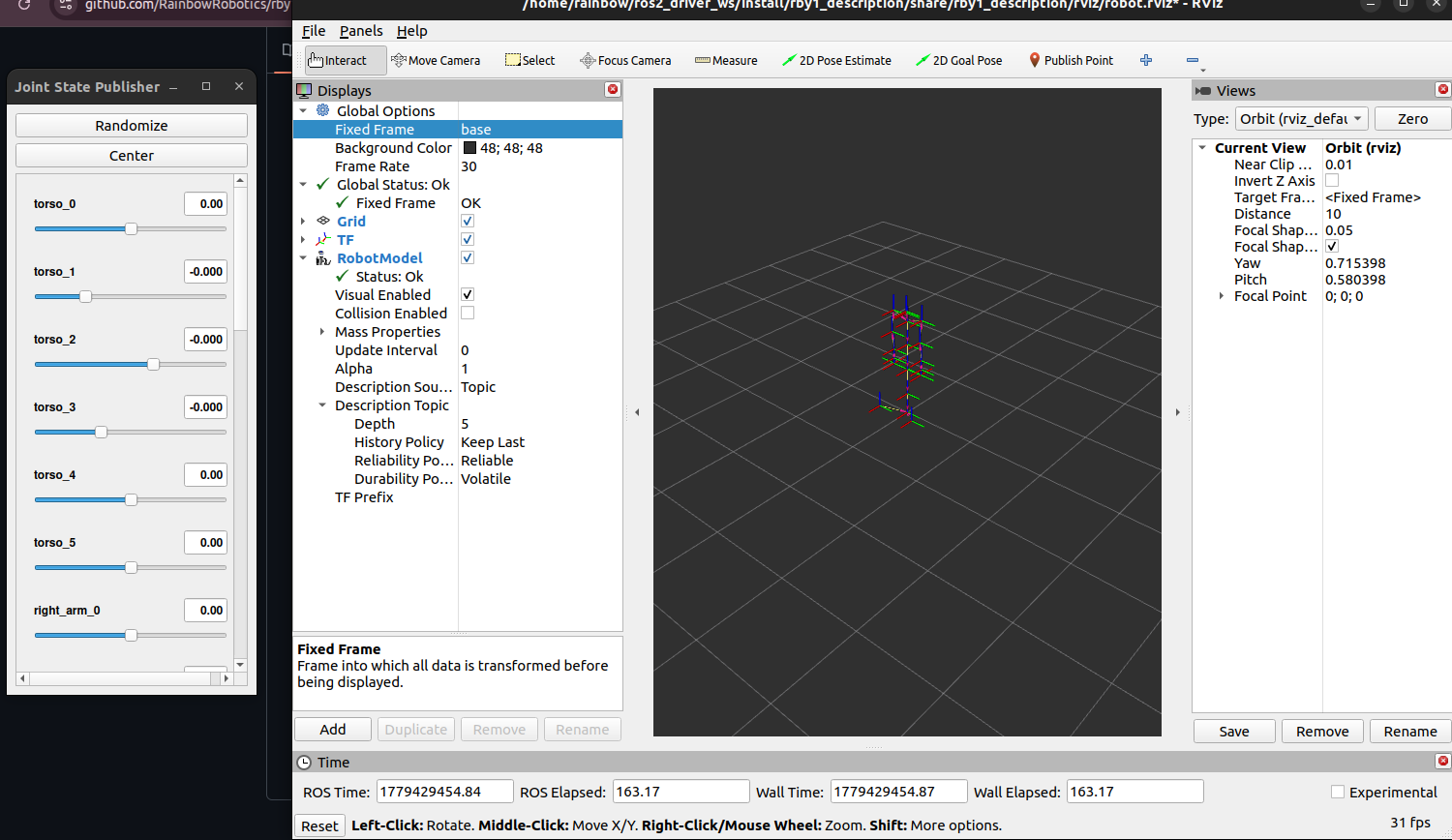
click RobotModel, and select Topics->
/robot_description
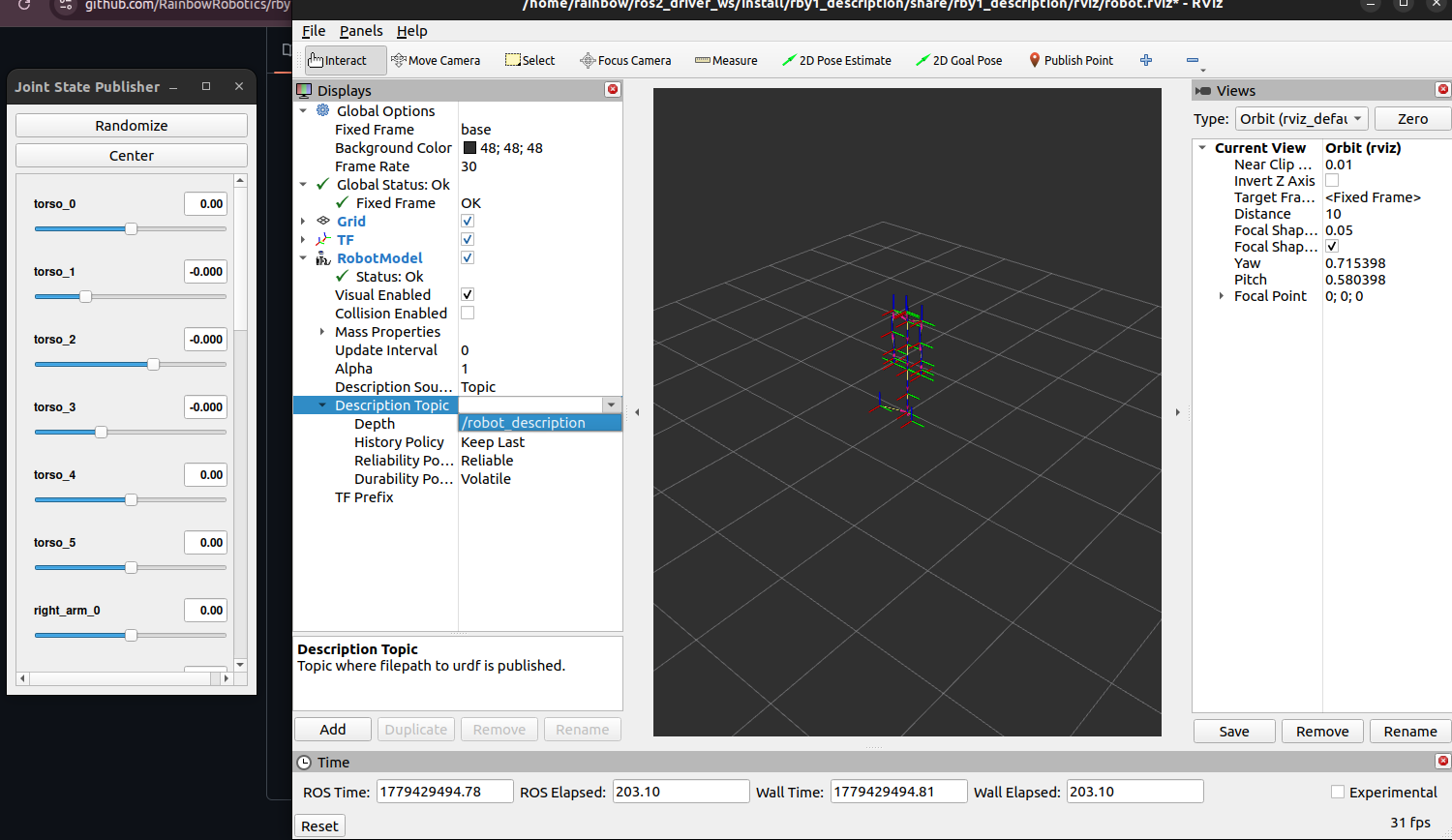
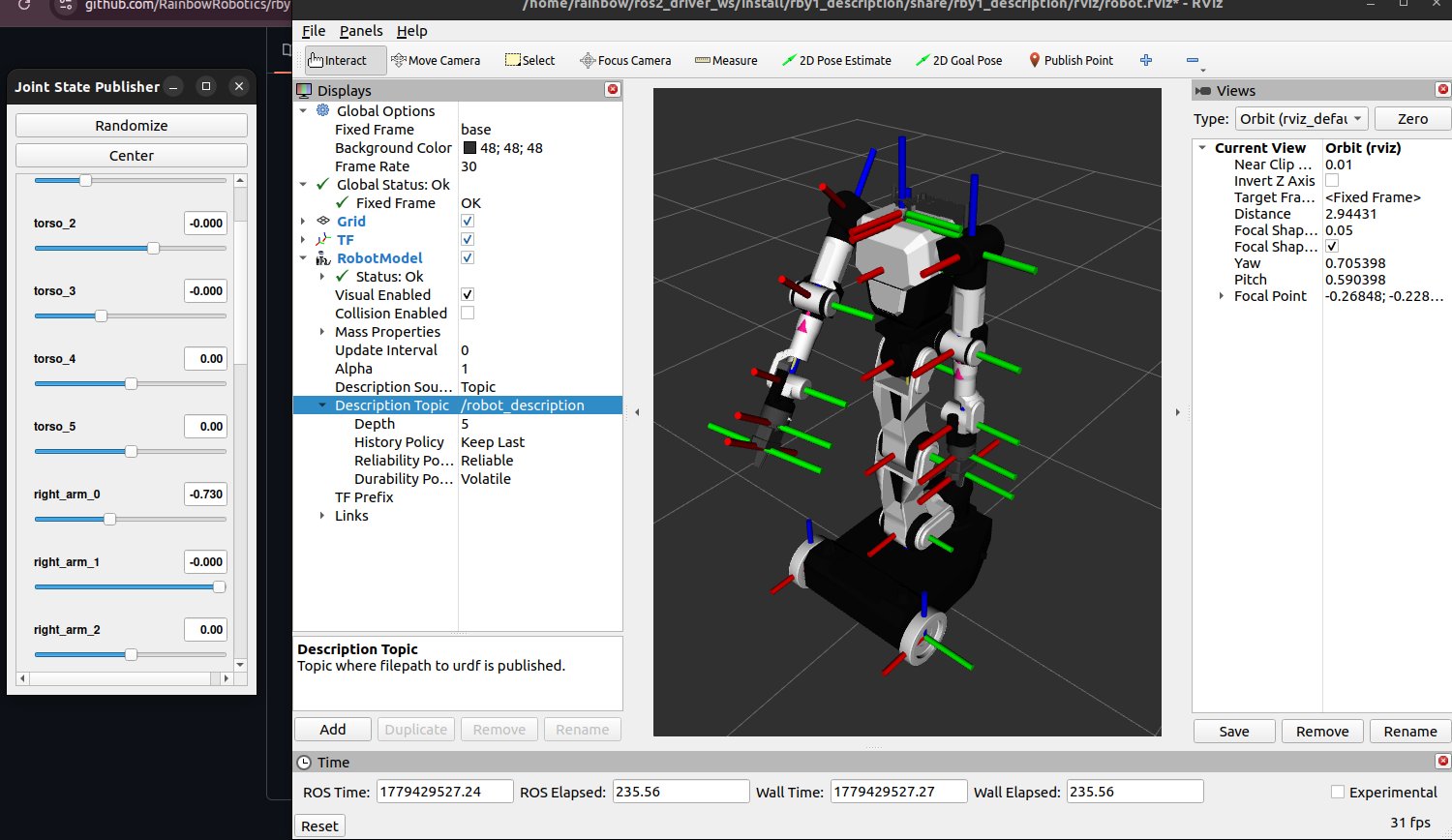
you can now control robot model by use joint state publisher gui