RPC Updater
How to Update RPC
Please use the provided updater program to update your RPC. During the update, the RPC will shut down, so make sure to put the robot in a safe position and connect the charger before proceeding.
Downloads (Updater)
updater : Download
You can check the latest RPC updates and release notes at the following link: RPC Release Notes on GitHub
Preparation (Updater)
Download the updater tool and extract the archive.
Download the appropriate RPC update file for your robot model from the release page.
Place the downloaded update file into the extracted updater directory.

Usage (Updater)
sudo apt-get install -y sshpass
tar -xvf updater.tar
cd updater_dist
chmod +x updater

# For ARM-based systems
./updater <update file name> <RPC IP address>

# For x86_64 systems
./updater_x86_64 <update file name> <RPC IP address>

# Example
./updater rby1_m_v1.2-0.10.6.tar.gz 192.168.30.1
./updater rby1_a_v1.0-0.10.6.tar 192.168.30.1
./updater_x86_64 rby1_a_v1.2-0.10.6.tar 192.168.0.192
Result Guide (Updater)
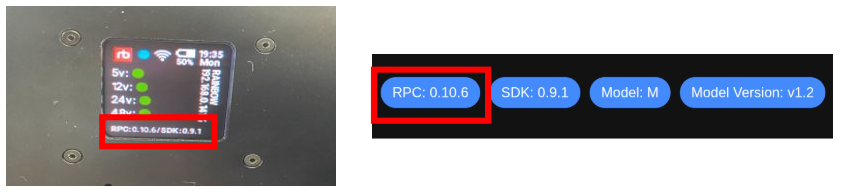
If the RPC update is completed successfully, you can verify the updated version in one of the following ways:
Check the version at the bottom of the Dashboard page in the Web UI
Check the version displayed on the backpack OLED